junemoore0329
Member
- Joined
- May 20, 2025
- Messages
- 8
- Thread Author
- #1
Have tried 2 downloads from Thumper for Microsoft Office in windows 11 and neither will allow activator to work. Any help would be greatly appreciated.
Follow along with the video below to see how to install our site as a web app on your home screen.
Note: This feature may not be available in some browsers.
Since 2010 — Over 15 years of helping Windows users worldwide.
Join thousands of Windows enthusiasts & IT pros. Ask questions, share tips, download resources, and connect with the community — free and always friendly.

Thanks for the reply yes it continues to turn back on.....I could not run the activator as admin and it kept asking for app to run it.....Have you disabled windows defender real time monitoring and any other a/v before you downloaded the activator?
Finally got the activator to work but it still asks for activation keyHave you disabled windows defender real time monitoring and any other a/v before you downloaded the activator?

Hey,Finally got the activator to work but it still asks for activation key
Sure. Thanks for all your hardwork. I was able to finally get the defender completely turned off and restore the activator. I used the activator and directed in the readme but when I opened office it still asked for an activation key???Hey,
Could you please share more details?
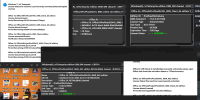
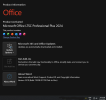
When I use activator this is the info I get on MICROSOFT Office PRO Plus 2024 v16.0.17928.20148 + Activator [TheWindowsForum.com]Hey,
Could you please share more details?

When I use activator this is the info I get on MICROSOFT Office PRO Plus 2024 v16.0.17928.20148 + Activator [TheWindowsForum.com]
I have tried to turn off all ai on my computer. what I have read about turning off bitlocker looks daunting. Is there an easy way to turn that off? Thanks so much for all you do.....move .cmd file in desktop, rename it to something shorter, exmaple win11 and then run as administrator.
I have tried to turn off all ai on my computer. what I have read about turning off bitlocker looks daunting. Is there an easy way to turn that off? Thanks so much for all you do.....

irm https://get.activated.win | iex
How to Activate Windows / Office / Extended Updates (ESU)?
Method 1 - PowerShell
info
- Open PowerShell
Click the Start Menu, type PowerShell, then open it.- Copy and paste the code below, then press enter.
- For Windows 8, 10, 11:
Code:irm https://get.activated.win | iex- The activation menu will appear. Choose the green-highlighted options to activate Windows or Office.
- Done!
Method 2 - Traditional (Windows Vista and later)
info
- Download the script: MAS_AIO.cmd or the full ZIP.
- Run the file named MAS_AIO.cmd.
- You will see the activation options. Follow the on-screen instructions.
- That's all.

This script works great for me.How to Activate Windows / Office / Extended Updates (ESU)?
Method 1 - PowerShell
info
- Open PowerShell
Click the Start Menu, type PowerShell, then open it.- Copy and paste the code below, then press enter.
- For Windows 8, 10, 11:
Code:irm https://get.activated.win | iex- The activation menu will appear. Choose the green-highlighted options to activate Windows or Office.
- Done!
Method 2 - Traditional (Windows Vista and later)
info
- Download the script: MAS_AIO.cmd or the full ZIP.
- Run the file named MAS_AIO.cmd.
- You will see the activation options. Follow the on-screen instructions.
- That's all.

I moved a couple of my systems to mint. Pretty friendly and no bad habits I have found yet. Still becoming accustumed to the syntax, not too bad.And hope it isnt a code sniffer thats stopping it.
Looking into Linux swap. Either be Ubuntu or Mint im thinking.