website stat Help with Firefox window layout win11 | The Windows Forum
Install the app
How to install the app on iOS

Follow along with the video below to see how to install our site as a web app on your home screen.

Note: This feature may not be available in some browsers.

Welcome to TheWindowsForum

Since 2010 — Over 15 years of helping Windows users worldwide.

Join thousands of Windows enthusiasts & IT pros. Ask questions, share tips, download resources, and connect with the community — free and always friendly.

  • Post & reply in threads
  • Private message other members
  • Access exclusive guides & downloads
  • NO ADS for registered users

Help with Firefox window layout win11

juco

Member
Joined
Apr 1, 2025
Messages
23
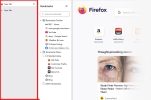
Moving from win7 to win11, slowly getting there but layouts confusing me.

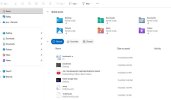
Attached is the layout on win 11, how to I get rid of the area outlined in red as it appears to me to be a duplicate of the bookmark window.

ThanksScreenshot 2025-11-16 220539.png
 
Last edited:
Hi, this area you highlighted isn’t actually a second bookmarks window — it’s the new Windows 11 “Navigation Pane” style that shows extra sections like Home, Quick Access, and Libraries.


If you want it to look more like Windows 7 and remove the extra section, try the following:


Option 1 — Simplify the Navigation Pane


  1. Open File Explorer
  2. Click View on the top
  3. Choose Navigation Pane
  4. Disable:
    • Home
    • Show All Folders
    • Expand to Open Folder

This will hide the extra pane sections so it looks cleaner and closer to Windows 7.


Option 2 — Restore Classic Navigation Pane (Most Similar to Win7)


  1. Open File Explorer
  2. Go to View → Navigation Pane
  3. Make sure only Navigation Pane is checked
  4. Uncheck everything else.
 
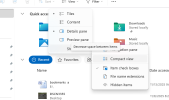
ok so I got to open navigation pane (see attached), but I don't see how to move from stage 3 to stage 4.
  1. Open File Explorer
  2. Go to View → Navigation Pane
  3. Make sure only Navigation Pane is checked
  4. Uncheck everything else.
I am not seeing how to disable...
  • Home
  • Show All Folders
  • Expand to Open Folder
  1. Screenshot 2025-11-17 192908 copy.jpg
 
Sorry I am being a pain, but click to what? I have opened the navigation pane.Screenshot 2025-11-17 223211.png
 
May I offer a suggestion.

Windows 11 and Firefox dont get on right now. Ive had a few issues given to me regarding your problem. Seems Firefox at present (Dec 25) has some issues with some of the updates done to windows 11.

I suggest you try a new Browser, I generally install either Google Chrome or if you want a really good one to use I would go with OPERA GX a decent browser and you can import your user settings from firefox into it or Chrome easily.

I stopped using Firefox 2024 when issue started to crop up like you are having.
 
I suggest you try a new Browser, I generally install either Google Chrome or if you want a really good one to use I would go with OPERA GX a decent browser
I have a couple of other issues to resolve first so currently using the old pc win7 mostly at the moment. It is on the cards to look at other browsers when I fully move to the win 11 pc.

Thanks for the suggestions though.
 
Going to concur to Diguelo. Mozilla has really lacked developer's enthusiasm for a while now, no cash to keep the project going at the level it once enjoyed. Unfortunately Microsoft killed Netscape with bundles of cash a long time ago. Since then, keeping a project going and updated exclusively on donated time and resources is sketchy at best. I haven't given Opera a good chance yet, I should.
 
Agreed Mr Dog, Opera GX however is a skin for chrome and TBH a well thought out and prctical one especially if you like browser gaming

Windows 7 you may need to be looking into Brower Archives on the net for the older versions to install. DO NOT USE Internet Explorer 5.0 - 6.0 it attracts more viruses and malware than a 100 watt bulb attracts moths in a forest

Going back to that time I recall OPERA being the browser of choice out of most of them, I believe there is an archive of old browsers with it in there for Win 7 86, dunno about 64

Oh and ISSUES are our specialty, help is on hand
 
More help....
Wireless working of for internet, however when I try and send a programme to my 3d printer I get this message.

..."Reason: curl:SSL peer certificate or SSH remote key was not ok:SSL certificate problem: unable to get local issuer certificate [Error 60]"....

It has been suggested it may be the firewall but have also been given this command prompt but I am hesitant to mess with the registry.

...certutil -generateSSTFromWU roots.sst
certutil -addstore -f root roots.sst"...

Any advice before I mess with any of it.
 
More help....
Wireless working of for internet, however when I try and send a programme to my 3d printer I get this message.

..."Reason: curl:SSL peer certificate or SSH remote key was not ok:SSL certificate problem: unable to get local issuer certificate [Error 60]"....

It has been suggested it may be the firewall but have also been given this command prompt but I am hesitant to mess with the registry.

...certutil -generateSSTFromWU roots.sst
certutil -addstore -f root roots.sst"...

Any advice before I mess with any of it.


This is not a registry issue. The error is caused by missing or outdated Windows root certificates.

First, make sure Windows Update is fully up to date.

If the issue continues, you can safely refresh the trusted root certificates using certutil (this does NOT manually edit the registry).

Run Command Prompt as Administrator and use:
certutil -generateSSTFromWU roots.sst
certutil -addstore -f root roots.sst

After that, restart your PC and try again.

This is a known Windows 11 SSL certificate issue and is not related to the printer itself.
 
I haven't updated windows yet, i did however type in the certutil..... and got this message:

certutil -generateSSTFromWU roots.sst

When I type that in I get message.

certutil –generateSSTFromWU’ is not recognized as an internal or external command,operable program or batch file.

I am positive I have typed in correctly.

Just checked updates it has had several last 2 were security updates in Nov & Dec, previous were Cumulative updates.
 
Last edited:

Support TheWindowsForum

Help us stay ad-free and keep the community running

Donate Now

Trending content

Back
Top