website stat Photoshop 2026 - Installation failed | The Windows Forum
Install the app
How to install the app on iOS

Follow along with the video below to see how to install our site as a web app on your home screen.

Note: This feature may not be available in some browsers.

Welcome to TheWindowsForum

Since 2010 — Over 15 years of helping Windows users worldwide.

Join thousands of Windows enthusiasts & IT pros. Ask questions, share tips, download resources, and connect with the community — free and always friendly.

  • Post & reply in threads
  • Private message other members
  • Access exclusive guides & downloads
  • NO ADS for registered users

Photoshop 2026 - Installation failed

BNP

New Member
Joined
Dec 29, 2025
Messages
1
Hello,
I'm trying to install Photoshop 2026, following the instructions inside '_ReadMe.txt', but I'm getting an error on the second step (right after disabling the AV step) - running the 'Set-up.exe'.

The error occurs at the very beginning of the installation (at 5%) and the error message is (screenshot attached):
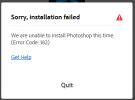
1767011715677.png

I've also tried running the Set-up.exe without an internet connection but the result is the same.
Any advice?

Thanks

Btw, I've also installed Acrobat DC Pro 2023 which has the same instructions and it was installed without any issue...
 
Hello,
I'm trying to install Photoshop 2026, following the instructions inside '_ReadMe.txt', but I'm getting an error on the second step (right after disabling the AV step) - running the 'Set-up.exe'.

The error occurs at the very beginning of the installation (at 5%) and the error message is (screenshot attached):
View attachment 6901

I've also tried running the Set-up.exe without an internet connection but the result is the same.
Any advice?

Thanks

Btw, I've also installed Acrobat DC Pro 2023 which has the same instructions and it was installed without any issue...
this issue is usually not related to antivirus or internet access, especially since Acrobat installed fine on the same system.


At 5% the installer is still verifying components, so the most common causes are:


  • Corrupted or incomplete download
  • Missing Microsoft Visual C++ Redistributables
  • Running the setup from a protected path (Downloads / Desktop)

Suggestions:


  1. Re-extract or re-download the installer (verify files if possible).
  2. Move the setup folder to a simple path like C:\Adobe\ and run Set-up.exe as administrator.
  3. Make sure all VC++ Redistributables (2015–2022 x64) are installed.
  4. Temporarily disable any third-party security software (not just Defender).
  5. Reboot and try again.

Since Acrobat installed successfully, this points more to a package-specific issue with the Photoshop installer rather than your system.
 

Support TheWindowsForum

Help us stay ad-free and keep the community running

Donate Now

Trending content

Back
Top