website stat Previewing for accessing Phone Link features from the Start menu with Windows Insiders | The Windows Forum
Install the app
How to install the app on iOS

Follow along with the video below to see how to install our site as a web app on your home screen.

Note: This feature may not be available in some browsers.

Welcome to TheWindowsForum

Since 2010 — Over 15 years of helping Windows users worldwide.

Join thousands of Windows enthusiasts & IT pros. Ask questions, share tips, download resources, and connect with the community — free and always friendly.

  • Post & reply in threads
  • Private message other members
  • Access exclusive guides & downloads
  • NO ADS for registered users

Previewing for accessing Phone Link features from the Start menu with Windows Insiders

TWF Bot

Staff member
Joined
Nov 29, 2020
Messages
3,663
Hello Windows Insiders, We are gradually rolling out a new feature, which allows you to use your mobile device directly from the Start menu on your Windows 11 PCs, to Windows Insiders in the Beta Channel. With this feature, you can stay connected and effortlessly access your mobile device's functionalities right from the Start menu. Key features include:
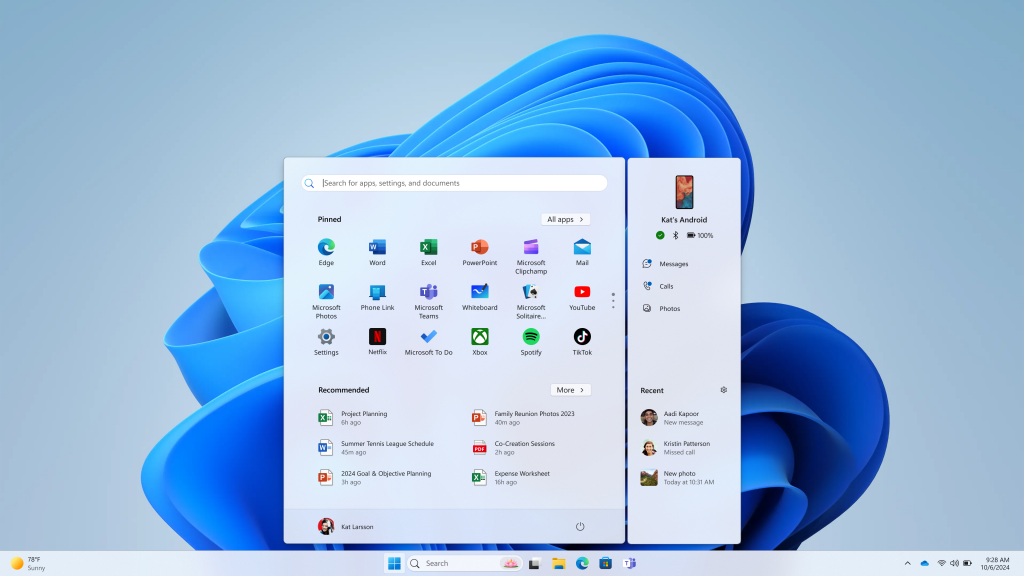
  • Effortless Connectivity: View your phone's battery status and connectivity right from the Start menu on your Windows 11 PC.
  • Unified Communication: Access your phone messages, calls, and photos directly from Start, ensuring you never miss an important update or moment.
  • Continuity of Experience: Pick up where you left off with the latest activities from your phone, all seamlessly integrated into your Start menu experience.
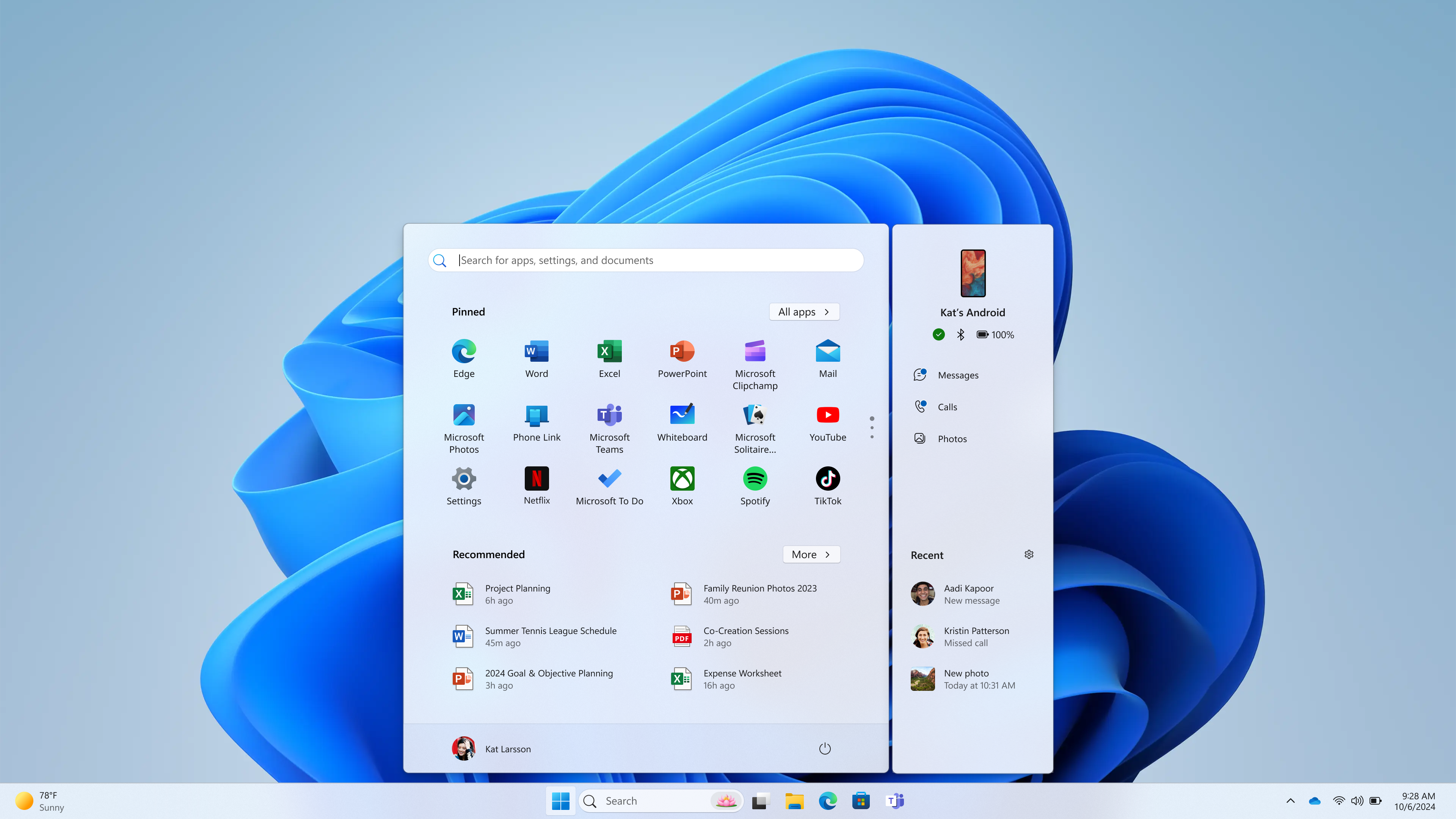
[caption id="attachment_177149" align="alignnone" width="1024"]Feature for managing your mobile device shown next to the Start menu. Feature for managing your mobile device shown next to the Start menu.[/caption] This feature is gradually rolling out to the Windows Insider community and available only for Android users on Windows 11 who are already connected via Phone Link. iOS support will be coming at a later date. This experience can be managed via Settings > Personalization > Start (support link). Requirements:
  • Windows 11 Insider Preview Build 22635.3790 and higher in the Beta Channel. (Other Insider Channels coming at a later date.)
  • Phone Link version 1.24052.124.0 and higher.
FEEDBACK: Please file feedback in Feedback Hub (WIN + F) under Desktop Environment > Start Menu. Give it a try and let us know your feedback and suggestions. You can also join the conversation on our Windows Insider community forums and social media channels. Thanks, Windows Insider Program & Phone Link Teams

Continue reading...
 
Personally my computer and my phone (Pixel) have no reason sharing info and pushing that data upstream.
 
AGREED.

Come on Mr Bot, get your act together here. nobody in their right mind would link their phone to Microsoft.
 
Hello Windows Insiders, We are gradually rolling out a new feature, which allows you to use your mobile device directly from the Start menu on your Windows 11 PCs, to Windows Insiders in the Beta Channel. With this feature, you can stay connected and effortlessly access your mobile device's functionalities right from the Start menu. Key features include:
  • Effortless Connectivity: View your phone's battery status and connectivity right from the Start menu on your Windows 11 PC.
  • Unified Communication: Access your phone messages, calls, and photos directly from Start, ensuring you never miss an important update or moment.
  • Continuity of Experience: Pick up where you left off with the latest activities from your phone, all seamlessly integrated into your Start menu experience.
[caption id="attachment_177149" align="alignnone" width="1024"]Feature for managing your mobile device shown next to the Start menu. Feature for managing your mobile device shown next to the Start menu.[/caption] This feature is gradually rolling out to the Windows Insider community and available only for Android users on Windows 11 who are already connected via Phone Link. iOS support will be coming at a later date. This experience can be managed via Settings > Personalization > Start (support link). Requirements:
  • Windows 11 Insider Preview Build 22635.3790 and higher in the Beta Channel. (Other Insider Channels coming at a later date.)
  • Phone Link version 1.24052.124.0 and higher.
FEEDBACK: Please file feedback in Feedback Hub (WIN + F) under Desktop Environment > Start Menu. Give it a try and let us know your feedback and suggestions. You can also join the conversation on our Windows Insider community forums and social media channels. Thanks, Windows Insider Program & Phone Link Teams

Continue reading...

Using streamlined setups to buy crypto instantly through synced phone alerts allows me to approve secure card operations in seconds. Integrating mobile activity straight into my primary desktop interface eliminates distractions and keeps all my operations moving efficiently.
Testing cross-device integration features on my desktop PC made me appreciate how much smoother multitasking becomes when you can handle smartphone notifications without picking up your phone. While managing complex technical documents on Windows, being able to monitor background app status directly from the taskbar saves substantial time during high-focus sessions. This unified workflow is especially convenient when completing multi-factor authentication steps or processing digital asset transactions
 
For the latest version of Android Smartphones it's been kind of hit or miss for me. Perhaps it's because I have 1 main system (laptop) 2 dedicated servers, another system that's more or less a main man pots and pans system. All these systems are hardwired to the same network, all assigned static IP addresses and BlueTooth active.
When it worked it was pretty cool, I am not sure what happened. Waiting to see if it was me o Microsoft. As I said, it allowed the phone to communicate with my PC, receive and send messages, I could make calls or so they said, never tried before it broke. Could be a very useful tool once Microsoft allows the users in the field to point out the bugs to them, since they don't seem to be doing a heck of a lot of pre-release testing <sigh>.
 

Support TheWindowsForum

Help us stay ad-free and keep the community running

Donate Now

Trending content

Back
Top