Hi,
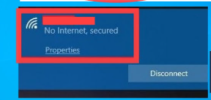
This issue usually happens when Windows gets the IP configuration wrong or when the DNS cache is corrupted.
Try the following steps — they fix this problem most of the time:
- Open Command Prompt (Admin) and run these commands one by one:
netsh winsock reset
netsh int ip reset
ipconfig /release
ipconfig /renew
ipconfig /flushdns
- Then restart your PC.
- If it still says “No Internet, secured,” try disabling and re-enabling your Wi-Fi adapter or reinstalling it from Device Manager.
- Finally, make sure your network profile is set to Private and check if you have any VPNs or firewalls interfering.
Let us know if it works for you or if the issue remains.




 Thread 'Hackers use new, fake crypto app to breach networks, steal cryptocurrency'