website stat Windows 11 Boot Failures After KB5066835 on MSI Aegis R2 | The Windows Forum
Install the app
How to install the app on iOS

Follow along with the video below to see how to install our site as a web app on your home screen.

Note: This feature may not be available in some browsers.

Welcome to TheWindowsForum

Since 2010 — Over 15 years of helping Windows users worldwide.

Join thousands of Windows enthusiasts & IT pros. Ask questions, share tips, download resources, and connect with the community — free and always friendly.

  • Post & reply in threads
  • Private message other members
  • Access exclusive guides & downloads
  • NO ADS for registered users

Windows 11 Boot Failures After KB5066835 on MSI Aegis R2

Chinquapin

Member
Joined
Jul 22, 2025
Messages
5
Posting in case this helps others dealing with weird boot loops or Secure Boot errors after recent Windows updates.

TL;DR:
If your MSI system won’t restart after Windows Update KB5066835, and it only boots once after toggling Secure Boot, try disabling “Fast Boot” in BIOS. The update seems to slow Secure Boot validation just enough to trip up Fast Boot’s short startup window. Once Fast Boot is off, Secure Boot can stay ON and multiple reboots work fine.

System: MSI Aegis R2 desktop OS: Windows 11 Pro 24H2 Build 26100.6899 (KB5066835) Date observed: 15 October 2025

Symptoms
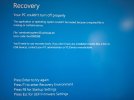
After installing Windows Update KB5066835, the system repeatedly failed to boot.
Blue-screen error 0xc0000098, 0xc0000001, or automatic repair loop.
Boot succeeded only once after toggling Secure Boot (either on or off), but failed on the next restart.
Windows Hello PIN reset prompt appeared after each successful boot.

Troubleshooting
Rebuilt EFI boot files (bcdboot, bootrec commands).
Verified Secure Boot keys (restored Factory Keys).
Tested both “Custom” and “Standard” Secure Boot modes.
Observed that the first boot after any BIOS change succeeded, but subsequent restarts failed.

Root Cause
KB5066835 appears to have updated Secure Boot–related EFI binaries or certificates.
These newer components take slightly longer to initialize.
When Fast Boot is enabled in MSI firmware, POST finishes before Secure Boot validation completes, causing timing failures and inconsistent boot behavior.

Resolution
Disabling Fast Boot in BIOS completely fixed the issue.
✅ Secure Boot remains ON
✅ Multiple restarts succeed
✅ No further blue screens or PIN resets

Status
Resolved by disabling Fast Boot in BIOS.
Confirmed working configuration:
Windows 11 24H2 Build 26100.6899 (KB5066835)
Secure Boot: ON
Fast Boot: OFF
 

Attachments

  • Blue Screen.jpg
    Blue Screen.jpg
    219.2 KB · Views: 4
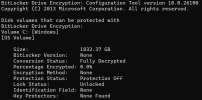
Did you have a look for BITLOCKER being active?
 
Could you please try uninstalling this update?
No thanks, I'm good. Disabling Fast Boot in BIOS fully resolved the problem for me. Since then I've even gone on to install Windows 11, version 25H2 with no issues.

Also, I understand that uninstalling a cumulative update may remove servicing stack dependencies and that some updates can’t be cleanly uninstalled if superseded by more recent ones.

I do expect an update from Microsoft, as user reports are surfacing that KB5066835 (and sibling update KB5065789) are causing breakages in IIS, Vault servers, and localhost networking on various Windows 11 systems. However, there's no telling how long such a fix will take to surface, given the extensive damage this cumulative update caused.
 
No thanks, I'm good. Disabling Fast Boot in BIOS fully resolved the problem for me. Since then I've even gone on to install Windows 11, version 25H2 with no issues.

Also, I understand that uninstalling a cumulative update may remove servicing stack dependencies and that some updates can’t be cleanly uninstalled if superseded by more recent ones.

I do expect an update from Microsoft, as user reports are surfacing that KB5066835 (and sibling update KB5065789) are causing breakages in IIS, Vault servers, and localhost networking on various Windows 11 systems. However, there's no telling how long such a fix will take to surface, given the extensive damage this cumulative update caused.

Glad to hear that you got it sorted out, and thanks for sharing your experience!
 
A thinking actively member. Most useful

{Cheers, applauds}

Go team.

Just out of sheer curiosity, seeing as I did the upgrade from 10 to 11 using the MS tool. Run the Manage bitlocker and post the result please. Mine did the upgrade and took all night, did the botlocker granny knows best update.
 
A thinking actively member. Most useful

{Cheers, applauds}

Go team.

Just out of sheer curiosity, seeing as I did the upgrade from 10 to 11 using the MS tool. Run the Manage bitlocker and post the result please. Mine did the upgrade and took all night, did the botlocker granny knows best update.
Well, hardly. :p

I received a "See what you have missed" email from the forum which reminded me that I was a member. And that reminded me that I should pass on my recent trials and tribulations with the buggy Windows update. And..., I even had help with the thinking part, as ChatGPT assisted with the debugging and writeup. What AI couldn't help with was intuition, as it was my idea to try disabling Fast Boot. Ha, ha!

Anyway, I'm happy to be here. I joined in appreciation for helping me get Excel, Word, and Outlook 2021 set up on my new computer. Unfortunately, that method no longer worked for my daughter awhile later. Perhaps a comment should be added to that post if its functionality has been disabled by MS.

Afraid I'll have to pass on the BitLocker stuff, though. My machine is running fine without that extra plot complication. ;)
 
Ok, thanks for the fast response, greatly appreciated.

Remember we are all here to help each other.
 
I got a message last week from Microsoft that there would be no further security or other updates for Windows 10. I found an option that Microsoft had provided that Windows 10 would be updated for the next 12 months.
I'm staying with Windows 10 at this time.
 
Yes the security updates to continue being available for the next 12 months. Due to the lack of people transferrign to Win 11 they have kind of backtracked on their elitist attitiude for computer level of engineering and finally realising not every person wants to get a new PC to upgrade an OS. Yet another boot up the rear end for the god of OS systems.

Windows 11 itself a lot has been uncovered in the last few weeks.
 
No thanks, I'm good. Disabling Fast Boot in BIOS fully resolved the problem for me. Since then I've even gone on to install Windows 11, version 25H2 with no issues.

Also, I understand that uninstalling a cumulative update may remove servicing stack dependencies and that some updates can’t be cleanly uninstalled if superseded by more recent ones.

I do expect an update from Microsoft, as user reports are surfacing that KB5066835 (and sibling update KB5065789) are causing breakages in IIS, Vault servers, and localhost networking on various Windows 11 systems. However, there's no telling how long such a fix will take to surface, given the extensive damage this cumulative update caused.

Thanks.
 
My computer got stuck in a booting loop due to this issue. None of the repair or restore options worked, so I ended up having to boot from a usb that had Windows 10 installed. Is there any way I can restore my previous Windows 11 account or access my documents that were under that account?
 

Support TheWindowsForum

Help us stay ad-free and keep the community running

Donate Now

Trending content

Back
Top