website stat Windows 11 Help and Support – Where Do We Go From Here? | The Windows Forum
Install the app
How to install the app on iOS

Follow along with the video below to see how to install our site as a web app on your home screen.

Note: This feature may not be available in some browsers.

Welcome to TheWindowsForum

Since 2010 — Over 15 years of helping Windows users worldwide.

Join thousands of Windows enthusiasts & IT pros. Ask questions, share tips, download resources, and connect with the community — free and always friendly.

  • Post & reply in threads
  • Private message other members
  • Access exclusive guides & downloads
  • NO ADS for registered users

Windows 11 Help and Support – Where Do We Go From Here?

Mark_SysSupport

New Member
Joined
Jul 3, 2025
Messages
3
Hey everyone,


I’ve been using Windows 11 for a few months now, and while I love the clean interface and improved features over Windows 10, I’ve run into a few recurring issues that made me wonder—what’s the best way to get solid help and support for Windows 11?


Sure, there’s the official Microsoft support, but I’ve found that sometimes the community has faster, more practical solutions. Whether it’s dealing with update failures, weird Taskbar behavior, or random network dropouts, I’m starting to realize that a reliable, centralized help space for Windows 11 would be gold.


Here’s what I’m wondering:


  • What are your go-to resources for solving Windows 11 problems?
  • Do you find the built-in Troubleshooter actually helpful?
  • Are there any underrated tools or tricks you use for diagnosing issues?
  • And maybe most importantly—do you feel like Windows 11 still lacks proper support channels compared to previous versions?

Let’s make this thread a helpful hub for anyone who’s looking for answers (or just a bit of digital therapy ). Share your tips, frustrations, and resources!


Looking forward to your thoughts.
 
Hey!


I totally get what you mean. Windows 11 does look sleek and has some neat improvements, but those quirks—like Taskbar glitches or random network drops—can be super frustrating.


For me, the official Microsoft support is sometimes slow or generic, so I usually turn to community forums like this one or places like Reddit’s Windows 11 threads. You’re right, the crowd-sourced fixes often come faster and feel more practical.


The built-in Troubleshooter can help with basic stuff, but honestly, it’s hit or miss. I’ve also found tools like PowerShell commands and Event Viewer really useful for digging deeper into problems when the usual fixes don’t cut it.


I do think Microsoft could improve how they handle Windows 11 support. It sometimes feels like the focus is more on pushing updates than on providing solid help when things go sideways. A centralized, community-backed resource would definitely be a game changer.


Thanks for starting this thread—it’s great to have a place to share and learn from real-world experiences. Looking forward to hearing what others think too!
 
Hey everyone,


I’ve been using Windows 11 for a few months now, and while I love the clean interface and improved features over Windows 10, I’ve run into a few recurring issues that made me wonder—what’s the best way to get solid help and support for Windows 11?


Sure, there’s the official Microsoft support, but I’ve found that sometimes the community has faster, more practical solutions. Whether it’s dealing with update failures, weird Taskbar behavior, or random network dropouts, I’m starting to realize that a reliable, centralized help space for Windows 11 would be gold.


Here’s what I’m wondering:


  • What are your go-to resources for solving Windows 11 problems?
  • Do you find the built-in Troubleshooter actually helpful?
  • Are there any underrated tools or tricks you use for diagnosing issues?
  • And maybe most importantly—do you feel like Windows 11 still lacks proper support channels compared to previous versions?

Let’s make this thread a helpful hub for anyone who’s looking for answers (or just a bit of digital therapy ). Share your tips, frustrations, and resources!


Looking forward to your thoughts.
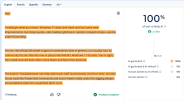
Personally, I use a mix of the Microsoft Answers forum, Reddit (r/WindowsHelp), and some tech blogs when I need quick fixes. The Troubleshooter works sometimes, but I mostly rely on community tips. Also, running SFC /scannow and DISM commands has helped fix weird glitches. And yeah, I agree—Windows 11 support feels a bit scattered compared to older versions. Hope this helps!
 
Why has Microsoft made networking in Windows 11 so back asswards? It's has some funny rules that may or may not apply and I am not sure why that takes place?
 
Hey!


I totally get what you mean. Windows 11 does look sleek and has some neat improvements, but those quirks—like Taskbar glitches or random network drops—can be super frustrating.


For me, the official Microsoft support is sometimes slow or generic, so I usually turn to community forums like this one or places like Reddit’s Windows 11 threads. You’re right, the crowd-sourced fixes often come faster and feel more practical.


The built-in Troubleshooter can help with basic stuff, but honestly, it’s hit or miss. I’ve also found tools like PowerShell commands and Event Viewer really useful for digging deeper into problems when the usual fixes don’t cut it.


I do think Microsoft could improve how they handle Windows 11 support. It sometimes feels like the focus is more on pushing updates than on providing solid help when things go sideways. A centralized, community-backed resource would definitely be a game changer.


Thanks for starting this thread—it’s great to have a place to share and learn from real-world experiences. Looking forward to hearing what others think too!
Bizarre to see so many AI generated responses on this website. Any AI scanner shows this is clearly a bot lmao

Like what's the point of having a bunch of AI slop writers running around your website?
 

Attachments

  • Screenshot 2025-07-24 174935.png
    Screenshot 2025-07-24 174935.png
    104.5 KB · Views: 3
Bizarre to see so many AI generated responses on this website. Any AI scanner shows this is clearly a bot lmao

Like what's the point of having a bunch of AI slop writers running around your website?
I understand your point of view, but I don't believe that employing AI to write automatically results in "slop" or useless text. The author is frequently merely employing AI as a tool to assist with ideation, language, and structure. The person behind the screen continues to provide the main ideas.

Like any other contemporary tool, artificial intelligence (AI) can help people express themselves more clearly, save time, and even inspire innovation. These days, it's commonplace, and using it doesn't diminish one's ability or sincerity.

What the material truly says and whether it adds value are more important than who writes every word.
 
After reading these very informative comments I'm staying with Windows 10 for as long as I can.
 
StartAllBack

Wonderful package makes windows 11 work just like windows 10 with options to play around with it. Cheap one shot install and works superbly. Ive been using it since my change to Windows 11 and it hasnt put a single foot wrong.
 

Support TheWindowsForum

Help us stay ad-free and keep the community running

Donate Now

Trending content

Back
Top