website stat Windows 11 Install Stuck at 99% – Is This Just Me or a Feature? | The Windows Forum
Install the app
How to install the app on iOS

Follow along with the video below to see how to install our site as a web app on your home screen.

Note: This feature may not be available in some browsers.

Welcome to TheWindowsForum

Since 2010 — Over 15 years of helping Windows users worldwide.

Join thousands of Windows enthusiasts & IT pros. Ask questions, share tips, download resources, and connect with the community — free and always friendly.

  • Post & reply in threads
  • Private message other members
  • Access exclusive guides & downloads
  • NO ADS for registered users

Windows 11 Install Stuck at 99% – Is This Just Me or a Feature?

DebugDruid

Member
Joined
Jul 4, 2025
Messages
11
Tried upgrading to Windows 11 and everything runs smoothly… until it hits 99% and just sits there forever. No error, no crash — just silence. Has anyone actually made it past 99% without doing a full reset or clean install?
 
Tried upgrading to Windows 11 and everything runs smoothly… until it hits 99% and just sits there forever. No error, no crash — just silence. Has anyone actually made it past 99% without doing a full reset or clean install?
Hi,

Why not doing clean install?
 
You're definitely not alone - getting stuck at 99% during a Windows 11 install is a known issue for some users. It often resolves after a long wait (sometimes over an hour), but in other cases, a clean install is the only fix. Make sure all drivers and BIOS are up to date before retrying. Disabling non-essential peripherals can also help.
 
It all depends on how the previous Windows being upgraded was configured. I noticed that while the Windows upgrade is in progress, it's not even a good idea to listen to YouTube on the browser, since I have two monitors, it's technically feasible, but the Windows upgrade doesn't like it. Sometimes the upgrade won't go through, so the Delete All option must be used. So you get a clean Windows.
 
Tried upgrading to Windows 11 and everything runs smoothly… until it hits 99% and just sits there forever. No error, no crash — just silence. Has anyone actually made it past 99% without doing a full reset or clean install?
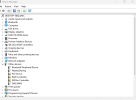
I had this happen on 1 installation upgrade only. It was a stupid thing really, but the overall issue was it needed a restart and didnt ask for it. Turned out to be a unsupported component in a machine I was upgrading. Once reboot had done the install restarted and completed leaving the item cause unsupported.

1772972417102.png

The specs for this machine are in my signitaure. I dont have the desktop system Wifi active and I dont use RAID. As for the SM Bus Controller it isnt used and Bluetooth isnt needed.

Windows 11 cross over from Windows 10 did the same as yours, but with so much of the system not in use it didnt know what to do.
 
Most pre-activated releases are meant for new installation only. To do an upgrade, you will need an untouched release and also determine if you need a legacy or UEFI depending on your CMOS setup.
 

Support TheWindowsForum

Help us stay ad-free and keep the community running

Donate Now

Trending content

Back
Top