
Diguelo
Donator
- Joined
- Feb 1, 2023
- Messages
- 893

- Thread Author
- #1
Seems our friend at Microsoft have neglected to keep us informed that POWERSHELL (WINDOWS TERMINAL) may not be one of the auomatic updates in the WINDOWS UPDATES list.
However soon sorted out, quick tutorial
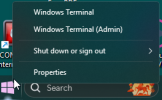
Right click on start, then either of the totp 2 options. Before panic sets in you arent going to be required to use this program, we are just going to update it to the latest stable version from a website. SO in answer to your "I cant do this, what does this guy think I am a geneious!" reponse, its very easy and very useful.

in the window you will see the following message
Sadly this isnt included in the automatic updates or if it is im just too damn lazy to be bothered huinting through the 450,000 updates Microsfot makes a week, sorry I meant errors from when they should have thought of this from day -600. Windwos can be eq2uated to a Pizza, Oh lets try a base for this pizza, ok cook it, but we forgot the sauce, ok ad some sauce, then cook, it, its a bit bland, what about topping it off with cheese, ok make a base, add the dauce and throw cheese on it, then cook it. But its a bit bland how do we make it more exciting, lets throww on Some Anchovies, ok make a base add sauce throw on anchovies and then cheese and bake it. Great now what do we call it boss, I know "Windows 8".
Nobody like Anchovies and windows 8, BLURRR
You get the idea. There comes a time when updates just get forgeotten about in the making of the Pizza this is one of those times a case of "Oh its not one of ours" moment.
Anyway back to the plot.
so the link you can highlight it, put the mouse pointer at one end of the URL, hold the left button and drag to the other end. now Hold down the CTRL button and press the letter C
well dont you just learned how to copy in DOS or if you want to, do it to the link placed here for your convenience

Next open your WEB browser, whatever flavour that is and paste it into the address bar, either use the right click menu now as your arent in DOS mode or you can learn something new, click in the address bar, delete the contants and hold down CTRL and press V, now you learned how to PASTE in DOS. I dont know how I do it for the price, I really dont.
Ok press return and you will find yourself at
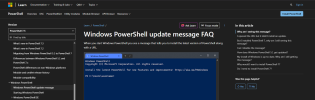
Ok this page is so full of excuses (listed on the right hand side, Ignore these for now, you can have fun with them shortly
Scroll down to this message

AKA as we all know means someone acting as someone else, "A bunck of good programmers" AKA Microsoft about somes it up.
Click the install Powershell link
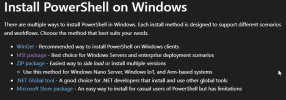
At this point you can get whatever flavour of installer you, your wife, your dob or even your Butcher is comfortable with
Persoanlly on Windows 11 I went for the MSI package, no hassle, download and click on it and the (English coloqueal phrase from Yorkshire) "JOBS A GUD UN" follow the Next next finish and what was Windows POWERSHELL is installed and a far betterer version it is too.
Ok your lesson for today is complete and I hope you all had a laugh doing it. You can of course go back to the help list on the right I was talking about earlier and throw some grief Microsofts way.
(Wanders of down the long dark corridor, in the distance you hear a door close)
However soon sorted out, quick tutorial
Right click on start, then either of the totp 2 options. Before panic sets in you arent going to be required to use this program, we are just going to update it to the latest stable version from a website. SO in answer to your "I cant do this, what does this guy think I am a geneious!" reponse, its very easy and very useful.
in the window you will see the following message
Sadly this isnt included in the automatic updates or if it is im just too damn lazy to be bothered huinting through the 450,000 updates Microsfot makes a week, sorry I meant errors from when they should have thought of this from day -600. Windwos can be eq2uated to a Pizza, Oh lets try a base for this pizza, ok cook it, but we forgot the sauce, ok ad some sauce, then cook, it, its a bit bland, what about topping it off with cheese, ok make a base, add the dauce and throw cheese on it, then cook it. But its a bit bland how do we make it more exciting, lets throww on Some Anchovies, ok make a base add sauce throw on anchovies and then cheese and bake it. Great now what do we call it boss, I know "Windows 8".
Nobody like Anchovies and windows 8, BLURRR
You get the idea. There comes a time when updates just get forgeotten about in the making of the Pizza this is one of those times a case of "Oh its not one of ours" moment.
Anyway back to the plot.
so the link you can highlight it, put the mouse pointer at one end of the URL, hold the left button and drag to the other end. now Hold down the CTRL button and press the letter C
well dont you just learned how to copy in DOS or if you want to, do it to the link placed here for your convenience
Windows PowerShell update message FAQ - PowerShell
This article explains the intent of the update notification message in Windows PowerShell.
aka.ms
Next open your WEB browser, whatever flavour that is and paste it into the address bar, either use the right click menu now as your arent in DOS mode or you can learn something new, click in the address bar, delete the contants and hold down CTRL and press V, now you learned how to PASTE in DOS. I dont know how I do it for the price, I really dont.
Ok press return and you will find yourself at
Ok this page is so full of excuses (listed on the right hand side, Ignore these for now, you can have fun with them shortly
Scroll down to this message
AKA as we all know means someone acting as someone else, "A bunck of good programmers" AKA Microsoft about somes it up.
Click the install Powershell link
At this point you can get whatever flavour of installer you, your wife, your dob or even your Butcher is comfortable with
Persoanlly on Windows 11 I went for the MSI package, no hassle, download and click on it and the (English coloqueal phrase from Yorkshire) "JOBS A GUD UN" follow the Next next finish and what was Windows POWERSHELL is installed and a far betterer version it is too.
Ok your lesson for today is complete and I hope you all had a laugh doing it. You can of course go back to the help list on the right I was talking about earlier and throw some grief Microsofts way.
(Wanders of down the long dark corridor, in the distance you hear a door close)


