website stat AutoData 3.45 This version of the CD has expired ERROR! | The Windows Forum
Install the app
How to install the app on iOS

Follow along with the video below to see how to install our site as a web app on your home screen.

Note: This feature may not be available in some browsers.

Welcome to TheWindowsForum

Since 2010 — Over 15 years of helping Windows users worldwide.

Join thousands of Windows enthusiasts & IT pros. Ask questions, share tips, download resources, and connect with the community — free and always friendly.

  • Post & reply in threads
  • Private message other members
  • Access exclusive guides & downloads
  • NO ADS for registered users

AutoData 3.45 This version of the CD has expired ERROR!

om3n

New Member
Joined
Oct 7, 2025
Messages
1
Hi

i have tried to install Autodata for 2 days now, i tried first on windows 10 but got all types of errors all the time.

so i setup a virtualbox with XP and got everything to work except this error! "This version of the CD/DVD has expired"

i can't find any information about how to fix it, so?

please help me before i get insane :D
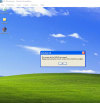

Namnlös.png
 
Mate, change the system date in your vm to something like 2020 or before.
make sure you turn off time sync in the vm settings.

You did say Vbox, which I don't think syncs the time with the host OS.

vmware > virtual machine settings > options > vmware tools features > synchronise guest time with host = deselected
 
Last edited:
Mate, change the system date in your vm to something like 2020 or before.
make sure you turn off time sync in the vm settings.

You did say Vbox, which I don't think syncs the time with the host OS.

vmware > virtual machine settings > options > vmware tools features > synchronise guest time with host = deselected

He's right.
 

Support TheWindowsForum

Help us stay ad-free and keep the community running

Donate Now

Trending content

Back
Top