- Joined
- Jun 26, 2021
- Messages
- 1,405

- Thread Author
- #1
Spot on tips that actually work 
 techjournal.org
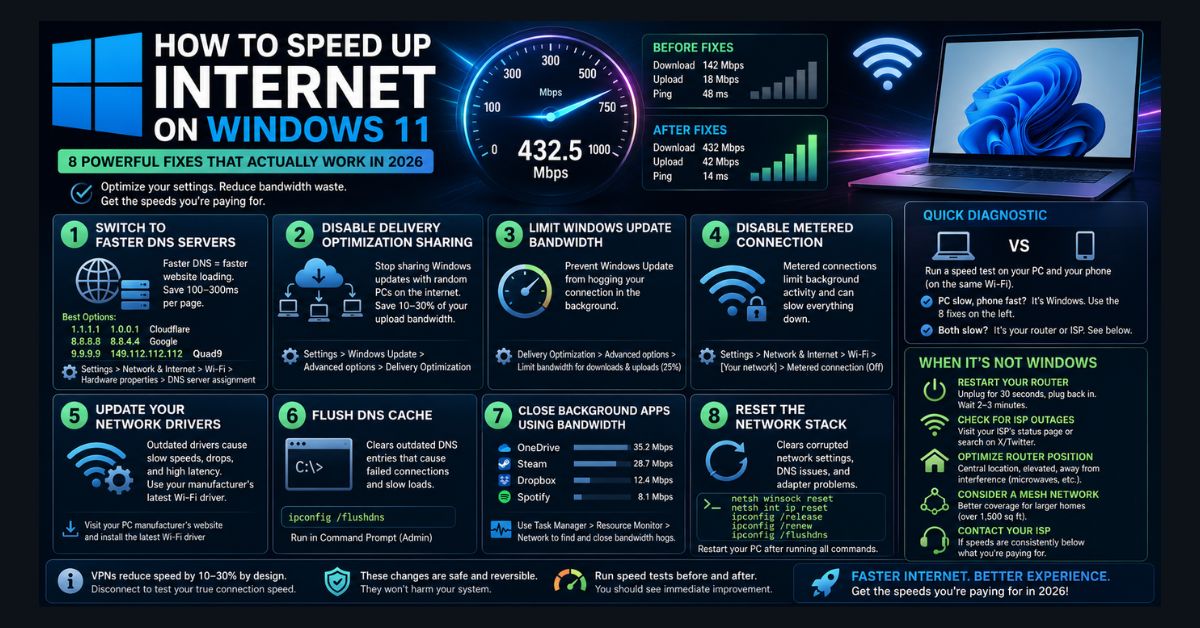
Also, don't forget to set the DNS settings in the router to Cloudflare DNS 1.1.1. and 1.0.0.1 or Google to get the speed improvements. Also, do the same in the adapter settings as well. Trust me, they work.
The local IP depends on your router; some have access or start with 192.168.0.1 or 192.168.4.1, and you set the IP in the router to start with, for example, 192.168.1.32, so all other computers on your network would start from 192.168.1.33 through 192.168.1.255. And when you give each device a dedicated IP, it is much faster transferring files between computers on the same IP ranges, which works great for me.
How to Speed Up Internet on Windows 11 (2026)
How to Speed Up Internet on Windows 11 — 8 Proven Fixes (2026)
Windows 11 internet running slow? Here are 8 proven fixes including DNS optimization, bandwidth settings, and network driver updates that work in May 2026.
techjournal.org
Also, don't forget to set the DNS settings in the router to Cloudflare DNS 1.1.1. and 1.0.0.1 or Google to get the speed improvements. Also, do the same in the adapter settings as well. Trust me, they work.
The local IP depends on your router; some have access or start with 192.168.0.1 or 192.168.4.1, and you set the IP in the router to start with, for example, 192.168.1.32, so all other computers on your network would start from 192.168.1.33 through 192.168.1.255. And when you give each device a dedicated IP, it is much faster transferring files between computers on the same IP ranges, which works great for me.
Last edited: