Follow along with the video below to see how to install our site as a web app on your home screen.
Note: This feature may not be available in some browsers.
Welcome to TheWindowsForum
Since 2010 — Over 15 years of helping Windows users worldwide.
Join thousands of Windows enthusiasts & IT pros. Ask questions, share tips, download resources,
and connect with the community — free and always friendly.
Re-install windows in the process format the drive and use all the space as 1 partition, then should be fine after that... Or use a partition app to create a new partition from the remaining, 246GB
Who said it had a 256GB SSD? Did you install the O/S or is this what was already there? What O/S is installed that is reporting 10GB? I take it this is a used piece. We need facts my man. Welcome to the forum.
Hi. I got this from a friend. Then it had WINDOWS 7 installed on SSD. I formatted and installed W10 on the HDD. My friend says the SSD was 256 GB and the same is stated in reviews of the Alienware 14.
Show 3 more This article discusses the manner in which Windows supports hard disks that have a storage capacity of more than 2 TB and explains how to initialize and partition disks to maximize space usage. Original KB number: 2581408
Summary
In order for an operating system to fully support storage devices that have capacities that exceed 2 terabytes (2 TB, or 2 trillion bytes), the device must be initialized by using the GUID Partition Table (GPT) partitioning scheme. This scheme supports addressing of the full range of storage capacity. If the user intends to start the computer from one of these large disks, the system's base firmware interface must use the Unified Extensible Firmware Interface (UEFI) and not BIOS.
This article outlines Microsoft support across all Windows versions since Windows XP. It also describes the requirements to address the full storage capability of these devices. Note
This article refers to disk capacity in powers of two instead of powers of 10, which is the more common designation on storage device capacity labels. Therefore, references to 2 TB actually refer to a product that is labeled as having 2.2 TB of capacity.
The operating system-specific behavior that is noted in this article also applies to the server variants of that system. Therefore, a reference to Windows 7 includes Windows Server 2008 R2, Windows Vista includes Windows Server 2008, and Windows XP includes Windows Server 2003 and Windows Server 2003 R2.
More information
The management of modern storage devices is addressed by using a scheme called Logical Block Addressing (LBA). It's the arrangement of the logical sectors that constitute the media. LBA0 represents the first logical sector of the device, and the last LBA designation represents the last logical sector of the device, one label per sector. To determine the capacity of the storage device, you multiply the number of logical sectors within the device by the size of each logical sector. The current size standard is 512 bytes. For example, to achieve a device that has a capacity of 2 TB, you must have 3,906,250,000 512-byte sectors. However, a computer system requires 32 bits (1 s and 0 s) of information to represent this large number. Therefore, any storage capacity that is greater than what can be represented by using 32 bits would require an additional bit. That is, 33 bits.
The problem in this computation is that the partitioning scheme that is used by most modern Windows-based computers is MBR (master boot record). This scheme sets a limit of 32 for the number of bits that are available to represent the number of logical sectors.
The 2-TB barrier is the result of this 32-bit limitation. Because the maximum number that can be represented by using 32 bits is 4,294,967,295, it translates to 2.199 TB of capacity by using 512-byte sectors (approximately 2.2 TB). Therefore, a capacity beyond 2.2 TB isn't addressable by using the MBR partitioning scheme.
To make more bits available for addressing, the storage device must be initialized by using GPT. This partitioning scheme lets up to 64 bits of information be used within logical sectors. It translates to a theoretical limitation of 9.4 ZB (9.4 zettabytes, or 9.4 billion terabytes). However, the issue that affects GPT is that most currently available systems are based on the aging BIOS platform. BIOS supports only MBR-initialized disks to start the computer. To restart from a device that is initialized by using GPT, your system must be UEFI-capable. By default, many current systems can support UEFI. Microsoft expects that most future systems will have this support. Customers should consult with their system vendor to determine the ability of their systems to support UEFI and disks that have storage capacities that are greater than 2 TB.
Overall requirements for a non-bootable data volume
For a system to be able to address the maximum capacity of a device that has a storage capacity of more than 2 TB, the following prerequisites apply:
The disk must be initialized by using GPT.
The Windows version must be one of the following (32-bit or 64-bit, unless otherwise noted, but including all SKU editions):
Windows Server 2008 R2 (only 64-bit version available)
Windows Server 2008
Windows 7
Windows Vista
The latest storage drivers from your storage controller manufacturer must be installed. For example, if your system uses an Intel storage controller that is set to "RAID" mode, make sure that you have the latest applicable drivers from the Intel support site.
Overall, you should contact your system vendor to determine whether the system supports device sizes of more than 2 TB.
Overall requirements for a bootable system volume
Assume that you want to meet the following conditions:
Have a storage device on which you can install Windows.
Make the storage device bootable.
Enable the operating system to address a maximum storage capacity for that device of greater than 2 TB.
To meet these conditions, the following prerequisites apply:
The disk must be initialized by using GPT.
The system firmware must use UEFI.
The Windows version must be one of the following (64-bit only, but including all SKU editions):
Windows Server 2008 R2
Windows Server 2008
Windows 7
Windows Vista
The latest storage drivers from your storage controller manufacturer must be installed. For example, if your system uses an Intel storage controller set to RAID mode, make sure that you have the latest applicable drivers from the Intel support site.
Note
Windows does not support starting GPT-initialized volumes by using UEFI systems on 32-bit versions of Windows. Also, legacy BIOS systems do not support starting GPT-partitioned volumes. Consult your system vendor to determine whether the system supports both UEFI and the startup of devices that have storage capacities of greater than 2 TB.
Support matrix
The following tables list Microsoft support for the various concepts that are discussed in this article. This information provides an overall support statement about disks that have a storage capacity of greater than 2 TB.
Table 1: Windows support for partitioning schemes as data volumes
Expand table
Windows 7
Supported
Not Supported
Supported
Windows Vista
Supported
Not Supported
Supported
Windows XP
Supported
Not Supported
Not Supported
[th]
System
[/th][th]
MBR
[/th][th]
Hybrid-MBR
[/th][th]
GPT
[/th]
Hybrid-MBR is an alternative style of partitioning that isn't supported by any version of Windows.
Table 2: Windows support for system firmware
Expand table
Windows 7
Supported
Supported
Windows Vista
Supported
Supported
Windows XP
Supported
Not Supported
[th]
System
[/th][th]
BIOS
[/th][th]
UEFI
[/th]
Table 3: Windows support for combinations of boot firmware and partitioning schemes for the boot volume
Expand table
Windows 7
Supported
Supported;
requires a 64-bit version of Windows
Boot volume not supported
Boot volume not supported
Windows Vista
Supported
Supported;
requires a 64-bit version of Windows
Boot volume not supported
Boot volume not supported
Windows XP
Supported
Not supported
Boot volume not supported
Boot volume not supported
[th]
System
[/th][th]
BIOS + MBR
[/th][th]
UEFI + GPT
[/th][th]
BIOS + GPT
[/th][th]
UEFI + MBR
[/th]
Table 4: Windows support for large-capacity disks as non-booting data volumes
Expand table
Windows 7
Supports up to 2 TB of addressable capacity**
Not Supported
Supports full capacity
Windows Vista
Supports up to 2 TB of addressable capacity**
Not Supported
Supports full capacity
Windows XP
Supports up to 2 TB of addressable capacity**
Not Supported
Not Supported
[th]
System
[/th][th]
>2-TB single disk - MBR
[/th][th]
>2-TB single disk - Hybrid-MBR
[/th][th]
>2-TB single disk - GPT
[/th]
Capacity beyond 2 TB cannot be addressed by Windows if the disk is initialized by using the MBR partitioning scheme. For example, for a 3-TB single disk that is initialized by using MBR, Windows can create partitions up to the first 2 TB. However, the remaining capacity cannot be addressed and, therefore, cannot be used.
Initialize a data disk by using GPT
The following steps show how to initialize a fresh disk by using the GPT partitioning scheme to help ensure that Windows can address the maximum available storage capacity. Make sure that you back up any important data before you try these steps.
Click Start, type diskmgmt.msc in the Start search box, right-click diskmgmt.msc, and then click Run as Administrator. If it's necessary, enter the credentials for a user account that has Administrator privileges.
Note
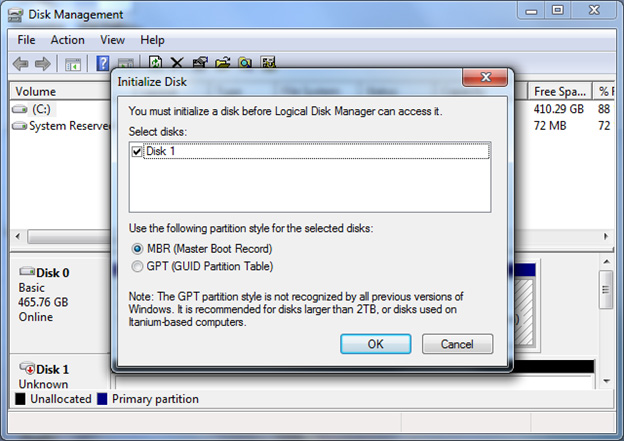
When a non-initialized disk is detected by Windows, the following window opens to prompt you to initialize the disk.
In the Initialize Disk dialog box, click GPT (GUID Partition Table), and then press OK.
Note
If you select this option, this hard disk will not be recognized by Windows versions earlier than and including Windows XP.
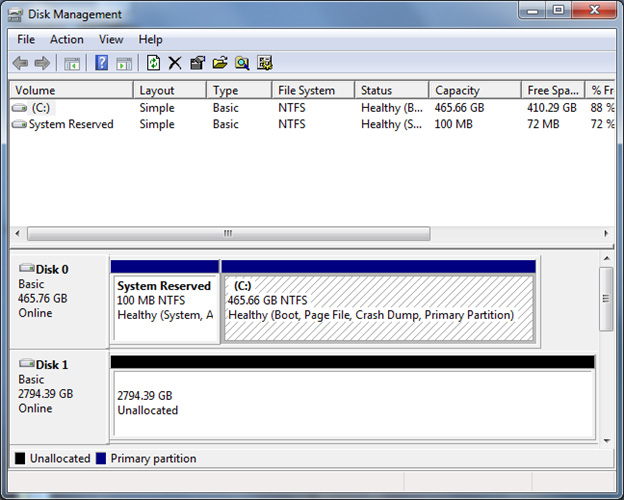
Check the Disk Management window to verify that the disk is initialized. If it is, the status row for that disk at the bottom of the window should indicate that the disk is Online.
After the disk is initialized, you must create a partition, and then format that partition by using a file system. It's to be able to store data in that partition, and assign a name and a drive letter to that partition. To do it, right-click the unallocated space on the right side of the status row for that disk, and then click New Simple Volume. Follow the steps in the partition wizard to complete this process.
Convert an MBR disk to GPT
If you have previously initialized the disk by using the MBR partitioning scheme, follow these steps to initialize the disk by using the GPT scheme. Make sure that you back up any important data before you try these steps.
Click Start, type diskmgmt.msc in the Start search box, right-click diskmgmt.msc, and then click Run as Administrator. If it's necessary, enter the credentials for a user account that has Administrator privileges.
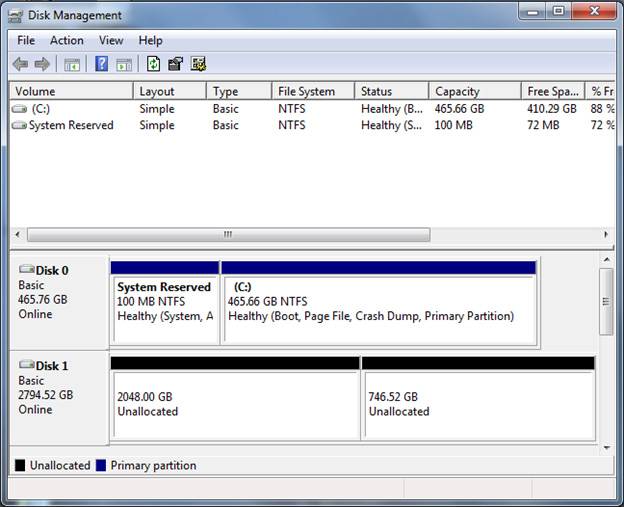
In the Disk Management window, examine the disk status rows at the bottom. In the following example, the user has a 3-TB disk that was previously initialized by using the MBR partitioning scheme. That device is labeled here as Disk 1.
Disk 1 contains two separate unallocated sections. This separation indicates that the first 2 TB of the disk space can be used. However, the remaining space is non-addressable because of the 32-bit addressing space limitation of the MBR partitioning scheme. To enable the system to fully address the total capacity of the storage device, you must convert the disk to use the GPT partitioning scheme.
Right-click the label on the left for the disk that you want to convert, and then click Convert to GPT Disk.
Note
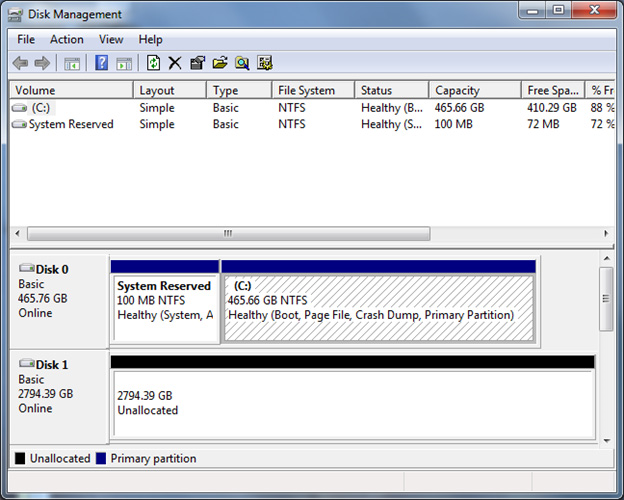
The display should now show that the full amount of available space in unallocated.
Now that the disk is initialized to access the full storage capacity, you must create a partition, and then format that partition by using a file system. It's to be able to store data in that partition, and assign a name and a drive letter to that partition. To do it, right-click the unallocated space on the right side of the status row for that disk, and then click New Simple Volume. Follow the steps in the partition wizard to complete this process.
Known issues or limitations
Because the transition to a single-disk capacity of greater than 2 TB has occurred fairly recently, Microsoft has investigated how Windows supports these large disks. The results reveal several issues that apply to all versions of Windows earlier than and including Windows 7 with Service Pack 1 and Windows Server 2008 R2 with Service Pack 1.
To this point, the following incorrect behavior is known to occur when Windows handles single-disk storage capacity of greater than 2 TB:
The numeric capacity beyond 2 TB overflows. It results in the system being able to address only the capacity beyond 2 TB. For example, on a 3-TB disk, the available capacity may be only 1 TB.
The numeric capacity beyond 2 TB is truncated. It results in no more than 2 TB of addressable space. For example, on a 3-TB disk, the available capacity may be only 2 TB.
The storage device isn't detected correctly. In this case, it isn't displayed in either the Device Manager or Disk Management windows. Many storage controller manufacturers offer updated drivers that provide support for storage capacities of more than 2 TB. Contact your storage controller manufacturer or OEM to determine what downloadable support is available for single-disk capacities that are greater than 2 TB.
SCSI sense data
When a disk encounters errors that are related to unreadable or unwritable sectors, it reports those errors and the relevant SCSI sense data to the operating system. SCSI sense data may contain information about LBA for sectors that were found to be unreadable or unwritable.
For LBA address space that is greater than 2 TB, the disk requires SCSI sense data in Descriptor format. This format isn't supported by Windows 7 or Windows Server 2008 R2, which retrieves SCSI sense data in Fixed format. Therefore, the retrieved SCSI sense data either does not contain information about bad sectors or it contains incorrect information about bad sectors. Administrators should note this limitation when they look for bad sector LBA information that's recorded in the Windows event log.
This site uses cookies to help personalise content, tailor your experience and to keep you logged in if you register.
By continuing to use this site, you are consenting to our use of cookies.