website stat Looking For Suggestions on Building a DAS | The Windows Forum
Install the app
How to install the app on iOS

Follow along with the video below to see how to install our site as a web app on your home screen.

Note: This feature may not be available in some browsers.

Welcome to TheWindowsForum

Since 2010 — Over 15 years of helping Windows users worldwide.

Join thousands of Windows enthusiasts & IT pros. Ask questions, share tips, download resources, and connect with the community — free and always friendly.

  • Post & reply in threads
  • Private message other members
  • Access exclusive guides & downloads
  • NO ADS for registered users

Looking For Suggestions on Building a DAS

DVDR_Dog

Ultimate Donator
VIP
Joined
Nov 5, 2018
Messages
3,473
I am thinking about building a DAS ( Direct-attached storage) to supplement my current WD pr4100 NAS. The NAS handles all the critical info (RAID 5). I am just thinking about slapping together some hard drives for network distribution of movies, music, programs, etc. If you can do without RAID protection you can grow or shrink the storage capacity of the DAS one drive at a time while RAID 5 demands all drives the same size or will adjust the max capacity to accommodate the smallest drive capacity.
So I don't need gaming capabilities although a robust last generation graphics card would speed video encoding if needed. It's been a very long time since I built a system from the ground up. Not sure if 4 drives will do the deed or I will have to install an addition interface card. I will need a sturdy power supply to power the drives and the video card. I was partial to MSI in the past and I never got over ASUS refusing warranty claims over failed electrolytic capacitors. As always I like to do things on the cheap. I have a pretty trustworthy source for used drives as well. Haven't settled n the server software yet. I'll start with Win 10 but I guess I should be Win 11 eventually. Keep in mind I don't need a hotrod, just a stable system that can hand out data and maintain decent speed doing so.
So go on, share with the Dog your thoughts and suggestions.
 
As mentioned Mr Dog, using RAID for storage is not a good plan. Use it for programs to make them work faster then yes, data storage, not a good idea at all. Reason being the RAID system doesnt like having data moved around all the time, expanded and contracted as you use it. All changes have to go onto 2 drives doing it.

RAID for programs and system.
NAS for storage, way safer.

I have a small server in home, 20TB tucked into a cupboard, used for gaming host and storage. I do a lot of flying in Falcon BMS and link to the server which keeps the scenario running in real time. That at two other servers are on a 3TB drive in the server.
Films and static storage (saved shows, music, real time TV recording ) all goes ont 4 x 4TB Hybrid drives. The controller board a ASUS X99 dual processor motherboard with sperate plug in drive manager board that handles the data. And a Asus Z170 motheboard with processor for the gaming server. All parts were from other machines, I dont like throwing thing out.

The networking has a dual socket output input card to and from the switch that links all my network together.

4 drives will be plenty. I have approx 500 hours of realtime recording on the server and enough video storage (depending or your flavour of Codec) to hold thousands of films and series. Its been getting some use this week as im off work for a few days.

If you are intending to use more than the 4 drives, I would recommend the use of Stand off boards for the drives rather than using the onboard sockets. Sadly daisy chaining SATA drives is not viable. The old gray ribbon cables has a lot to be said about it.

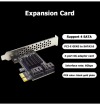
1768805498064.png

You can stick a couple of these in a motherboard and have the drive controllers handle all the HDD in your system. I would however recommend that all the drives ne matching and have a minimum of 256MB cache each. System latency is going to be an issue. If you use RAID the latency is going to increase. These boards cost around $10 each and use very little system resources.
Server side I would go for a Windows Server OS dedicated it will make life easier.

USING NAS is going to be a safer bet for your data, and of course FANS, FANS, FANS the more the case has the quieter it will be and the temperature curve becomes less important for daily use.

I of course am making suggestions for you to use and not telling what you must have. I give out advise and not instructions to be followed to the letter.

Message me if you want ideas for designs. And of course, have fun building it.
 
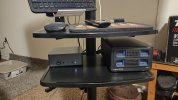
From 1 dog to another, I an using a BeeLink EQR-5 AMD Ryzen 5 Pro 5660U with a Cgnmate duel bay drive with switches set at Normal.

IMG_20260402_053212553.jpg

The mini system is running Win 10Pro so I can cast or network to my other systems in the house.

Drive aray.png
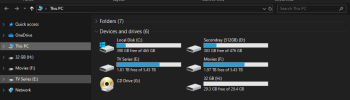
The M.2 SS drives in the mini are 500 GB and a 1TB. The double bay has 2 6TB HHD 1 of them is a NAS drive. I want to replace both HDD with larger drives something like 14 or 16TB.

I do all my own encoding so I can control file size as well as space.
TV Drive has 13,558 files of TV series. Movie Drive has 5062 Movies.
My main system has a full 14TB HDD with more movies and old TV series along with all my Music collection and E-Books.

Yah, I've been doing this for awhile.
Like Digualo stated using for storage or as space for a media collection is ideal. Before I forget, yes I do have clones of these drives. I learned my lesson about 15 years ago when My system was running and lighting hit the house, fried everything I had to start all over.

 
Lightning and power outages in your AREA????????????????????????????????????????????

Then

Go get yourself a 1500 W Uninterruptable power supply.

Your gear is protected from Power Surges, lightning strikes, nieghbours power dump when they turn on the cookers. Runs your gear on batteries internally and charges through the mains so the two circuits never meet, and if you get an outage your system stays on and working, generally youll have 10 minutes or more to finish what you are doing and save your work then safely close it down.

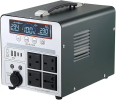
Personally I have a 1500W UPS under my desk it runs the Computer (see signiature), two 32 courved monitors, The sound amp, And the fam system that keeps it all cool

1775129273602.png

This ones big brother. It also hooks to the Audio Video system, tv sound etc and i get 1.5 hours of use if the power goes out. As the world goes into dying mode and resources dry up this is going to be the way of the future for us all, sooner than you think.
 
I am really lucky (I guess). I can see the twin cooling towers of a nuke out my door. I can be delivered power from so many directions and my last miles is underground. They replaced those last summer so I have never experienced a power interruption. In contrast where I grew up because of a national park was in my back yard and no power lines could be strung through there. as a result power could only be delivered in one direction I have always lived in semi-residential areas where there is plenty of trees to take down lines. My power not only could go out, it could for many hours. The utility company used to send us kids out to look for downed lines. We lost power frequently. It sucked. Working for a firm that controls the grid for 25% of my country. Not directly involved with operations, but I see it takes beaucoup hardware to pull it off real-time. Pretty wild.
 
Last edited:
From 1 dog to another, I an using a BeeLink EQR-5 AMD Ryzen 5 Pro 5660U with a Cgnmate duel bay drive with switches set at Normal.

View attachment 7067

The mini system is running Win 10Pro so I can cast or network to my other systems in the house.

View attachment 7068
The M.2 SS drives in the mini are 500 GB and a 1TB. The double bay has 2 6TB HHD 1 of them is a NAS drive. I want to replace both HDD with larger drives something like 14 or 16TB.

I do all my own encoding so I can control file size as well as space.
TV Drive has 13,558 files of TV series. Movie Drive has 5062 Movies.
My main system has a full 14TB HDD with more movies and old TV series along with all my Music collection and E-Books.

Yah, I've been doing this for awhile.
Like Digualo stated using for storage or as space for a media collection is ideal. Before I forget, yes I do have clones of these drives. I learned my lesson about 15 years ago when My system was running and lighting hit the house, fried everything I had to start all over.

Very nice. I have something similar but about x4. I am going to make some time to shrink my current set-up down. Currently 5 or 6 minis some quite powerful all with attached USB drives. One has a 4 bay DAS, and I have a WD pr4100 4 bay pretty advanced NAS all on my network as well as unknown number of smart devices 2 TVs and 5 of my laptops and portables. GF has various Apple stuff on the network too. Did I mention the surveillance cameras 4 of them and a Ring doorbell. Busy network, runs great. Cisco gear runs most of it. Omada gateway.

Addon: I am lucky(?) to have a pretty large nuke in my backyard. All the local power is underground with huge source redundancy which is really rare for the suburbs in the US. I didn't grow up that far from here but on the other side of a National Park. No power lines other than local park use and they are all underground which meant we had zero power source redundancy, one line in, that's it. We lost power at my house routinely in the summer months, mostly trees falling on power lines which meant we were SOL and it took some time for the power company to even find the down line
 
Last edited:
I am really lucky (I guess). I can see the twin cooling towers of a nuke out my door. I can be delivered power from so many directions and my last miles is underground. They replaced those last summer so I have never experienced a power interruption. In contrast where I grew up because of a national park was in my back yard and no power lines could be strung through there. as a result power could only be delivered in one direction I have always lived in semi-residential areas where there is plenty of trees to take down lines. My power not only could go out, it could for many hours. The utility company used to send us kids out to look for downed lines. We lost power frequently. It sucked. Working for a firm that controls the grid for 25% of my country. Not directly involved with operations, but I see it takes beaucoup hardware to pull it off real-time. Pretty wild.
Nice, well heres something to think about. In the UK the most often Lightning struck buildings are Power stations, Pylkons and Sub stations.
The whole point of having a UPS is to isolate your pc, monitors, servers and mains peripherals from the electricity grid. Every server system I have ever built from 1993 onwards has a full UPS system to protect it and up to now not a single one has failed due to lightning or power surges. You were looking for suggestions this is one that will protect your gear for decades of natural airborn disasters.

In my time of being buried in silicon chip work, I have seen many written off machines caused by the beautiful flash in the sky. Love to watch it.
 

Support TheWindowsForum

Help us stay ad-free and keep the community running

Donate Now

Trending content

Back
Top