
ThumperTM
Windows Ninja
- Joined
- Aug 18, 2010
- Messages
- 14,190

- Thread Author
- #1
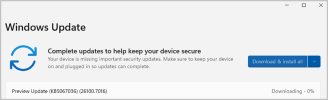
Microsoft announced important updates to Windows Update and the way the operating system reports available and installed updates. In a newly published blog post, the company revealed simplified names for each update. According to Microsoft, this change is to simplify the experience and make it more intuitive for users with "enhanced clarity and consistency."
With the new scheme, each update now has a "user-friendly" name and only the most relevant identifiers. These include a KB number, build number, or version number. Microsoft no longer includes unnecessary and complicated technical details, such as platform architecture, date prefixes, etc.
Here is what a cumulative update currently looks like in Windows Update history:
With the new approach, it will look like this:2025-10 Cumulative Update for Windows 11, version 25H2 for x64-based Systems (KB5066835) (26200.6899)
Microsoft says the new approach applies to quality updates for Windows (Patch Tuesday updates, preview updates, etc), .NET Framework updates, driver updates, AI components updates, and Visual Studio updates. You will see the updated names in Windows Update, Windows Update history, and on the Windows Release Health page. Updates in the Microsoft Update Catalog and Windows Server Update Services will remain unchanged, just like Windows feature updates.Security Update (KB5066835) (26200.6899)
Microsoft also offered an example of what each update will look like:
- Monthly or out-of-band security updates: Security Update (KB5034123) (26100.4747)
- Monthly preview non-security updates: Preview Update (KB5062660) (26100.4770)
- .NET Framework security updates: .NET Framework Security Update (KB5056579)
- .NET Framework non-security updates: .NET Framework Preview Update (KB5056579)
- Driver updates: Logitech Driver Update (123.331.1.0)
- AI component updates: Phi Silica AI Component Update (KB5064650) (1.2507.793.0)


