Follow along with the video below to see how to install our site as a web app on your home screen.
Note: This feature may not be available in some browsers.
Welcome to TheWindowsForum
Since 2010 — Over 15 years of helping Windows users worldwide.
Join thousands of Windows enthusiasts & IT pros. Ask questions, share tips, download resources,
and connect with the community — free and always friendly.
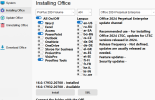
When I go to the install screen for this software it shows the radio buttons for x86 and x64 install but it does not allow me to select the x64 option. The system I am installing it on is an x64 system.
Generally the setup software senses what is available on your PC. The difference between the 2 versions is small but significant.
X86 is for the version that uses mainly 8086 processor code in its function, usually for laptops and older PC formats. Games prefer this environment because it is simple to code for.
X64 is for the more complex code that is the newer machines and laptops.
This software requires a DEDICATED x64 Machine to be able to run this type of software.
Generally the installer will look at a system and decide which of the two formats will run and work efficiently on your system, but it does allow the installation of both on an x64 machine. If your machine is not a x64 machine or you have the x86 Windows software installed, then it will default to x86and grey out the x64 option, as it appears to have done
This is the ifo about my main PC and in the line System Type it tells me I have 64-bit operating system.
To bring up this page on your pc RIGHT click on START. go up the list to SYSTEM and click on it. This will show you all you need to know about your machine. If the type of your machine is x86 or 32 bit then this version of OFFICE wont work.
This site uses cookies to help personalise content, tailor your experience and to keep you logged in if you register.
By continuing to use this site, you are consenting to our use of cookies.