Follow along with the video below to see how to install our site as a web app on your home screen.
Note: This feature may not be available in some browsers.
Welcome to TheWindowsForum
Since 2010 — Over 15 years of helping Windows users worldwide.
Join thousands of Windows enthusiasts & IT pros. Ask questions, share tips, download resources,
and connect with the community — free and always friendly.
i have the same problem. i just downloaded the files and in the activator folder the .cmd file is missing. tried everything with showing hidden and system files, downloading the torrent again etc. folder shows 2 files but only one appears in the folder - the readme file. Help would be greatly appreciated here
Last I heard the KMS crack scheme has been shut down by Microsoft. I am still seeing KMS style crack being distributed, so who knows.
KMS files were immediately trapped by Windows defender and never to be seen again. The forum has had many posts about the disappearing KMS cracks. Here's some really good rules to follow when installing a cracked program. Keep in mind if defender gets a whiff of KMS or many cracks, it will destroy them immediately in many cases. OK so here goes.
#1 Disconnect the system from the Internet.
#2 You need to disable "Real Time Protection" which continues to work even though you have disabled Defender.
Even though you have disabled Defender
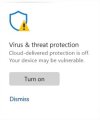
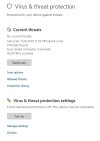
You really haven't, fooled ya. So if you left click anywhere on this box with the exception of "Turn on" or "Dismiss", another box appears.
Now when this box appears you need to left click on "Manage settings"
For sake of clarity, see reply to this post
OK so you left clicked on "Manage settings".
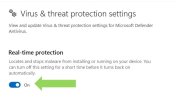
That brings yet another box up.
See where the green arrow is pointing? That's Microsoft's gotcha.
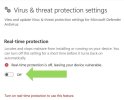
So move that slider to the left and the "Off" position. And there you go. You are now safe from Defender deleting whatever it doesn't like.
Keep in mind if you have disabled your third party A/V program (which you probably should) Defender takes over 100%. I have even found in rare cases "Real-time protection" will over-ride your resident third party A/V for some cracks.
Now you know why I have much love for Windows Defender, protector or whatever.
Oh BTW when you disable Real-time protection, Windows will keep sending nag boxes to remind you that you have no A/V protection. Also remember that you have disabled Real-time protection for a short period time or until you reboot. Have fun.
i have the same problem. i just downloaded the files and in the activator folder the .cmd file is missing. tried everything with showing hidden and system files, downloading the torrent again etc. folder shows 2 files but only one appears in the folder - the readme file. Help would be greatly appreciated here
This site uses cookies to help personalise content, tailor your experience and to keep you logged in if you register.
By continuing to use this site, you are consenting to our use of cookies.