- Joined
- Jun 26, 2021
- Messages
- 1,407

- Thread Author
- #1
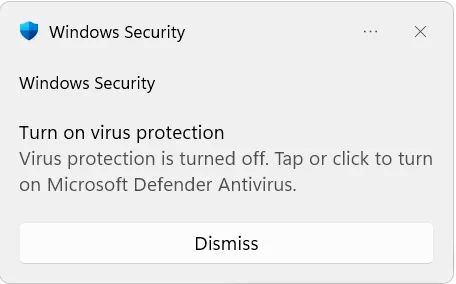
"Turn on Virus Protection" Notification appears after the latest update | Microsoft Community Hub
So after the latest Windows 11 update I constantly get a single notification from Windows Defender claiming that it was turned off and suggesting...
 techcommunity.microsoft.com
Who else is seeing this?
Search Assist
To resolve the "Turn on Virus Protection" notification issue after a Windows update, check that Windows Defender is active in the Virus & threat protection settings and consider submitting feedback to Microsoft if the problem persists, as it may be a known bug. Restarting your PC or logging out and back in may also help temporarily.
Windows 11 "Turn on virus protection" notification explained
Windows 11 "Turn on virus protection" notification explained One Windows 11 user says the "Turn on virus protection" notification...
 windows.gadgethacks.com
Does anyone have a confirmed FIX? I just figured it out.
Confirmed Fix
I just Click the
Windows Security
Then Click the
Virus & Threat Protection
Then Click the
Manage Settings
Then Click
Real-time protection to the OFF position
Wait a few seconds, then
Then Turn it back on
Wait a few seconds, then
Then turn it back off
Wait a few seconds, then
Then turn it back on and reboot the computer; it should be fixed.
I guess you can just turn it off once and back on to fix it. I just did it several times to make sure it fixes it.
Enjoy
Last edited: