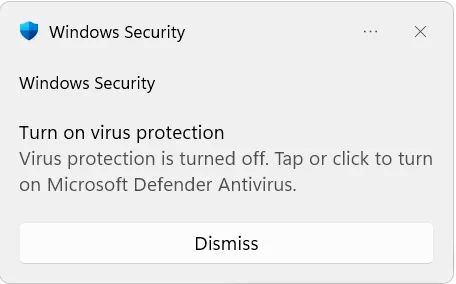
website stat Turn on Virus Protection" Notification appears after the latest update August 2026 | The Windows Forum
Install the app
How to install the app on iOS

Follow along with the video below to see how to install our site as a web app on your home screen.

Note: This feature may not be available in some browsers.

Welcome to TheWindowsForum

Since 2010 — Over 15 years of helping Windows users worldwide.

Join thousands of Windows enthusiasts & IT pros. Ask questions, share tips, download resources, and connect with the community — free and always friendly.

  • Post & reply in threads
  • Private message other members
  • Access exclusive guides & downloads
  • NO ADS for registered users

Turn on Virus Protection" Notification appears after the latest update August 2026

AFFASocial

Ultimate Donator
VIP
Joined
Jun 26, 2021
Messages
1,349

Who else is seeing this?


Search Assist

To resolve the "Turn on Virus Protection" notification issue after a Windows update, check that Windows Defender is active in the Virus & threat protection settings and consider submitting feedback to Microsoft if the problem persists, as it may be a known bug. Restarting your PC or logging out and back in may also help temporarily.


Does anyone have a confirmed FIX? I just figured it out.

Confirmed Fix

I just Click the

Windows Security

Then Click the

Virus & Threat Protection

Then Click the

Manage Settings

Then Click

Real-time protection to the OFF position

Wait a few seconds, then

Then Turn it back on

Wait a few seconds, then

Then turn it back off

Wait a few seconds, then

Then turn it back on and reboot the computer; it should be fixed.

I guess you can just turn it off once and back on to fix it. I just did it several times to make sure it fixes it.

Enjoy
 
Last edited:
I didn't have that happen to me on multiple systems, some with a 3rd party A/V program, others with Defender as the main A/V. I am wondering if this was an interaction with a particular A/V program, that wouldn't surprise me at all. Defender has a very weird relationship with other A/V programs, handing off major duties to a 3rd party A/V program and back again even if the 3rd party A/V is just even is disabled.
 
I only use Defender personally. I hate A/V programs; all they do is add LAG, and new threats are added after the fact. Basically, like IP banning is just a whack-a-mole. That is why I created the PHP Smartblocker 1.2. It does not care if you are a new threat; if you don't solve the puzzle captcha, you get blocked. This was also coded for human spammers, i.e., click farms, what this means is a human is paid pennies to create an account on your server, giving the spam they post a backlink The way I programmed it stops the click farms because what happens is the human starts the process, and at a certain point the human hands it to the automated process to finish the registration, and when they hand it off to the autoprocess, it changes IP addresses during the process, and then the code forces a new puzzle captcha when the IP changes, and the autoprocess thereafter cannot drag and drop the puzzle pieces and stops it again.

The final coding is a invitation code that is required during registration and if one is not added, they wast their time in the registration form getting 100% of nothing.

Basically, the site is a proven fortress. NO CRAP PERIOD.

Every connection is challenged, and even if we get past that stage, we still need an invitation code and must solve the hCaptcha as well during the registration process.

So the term "fortress" is accurate for my website LOL. I have not had a spam registration in a while.

Anyway I noted what I had to do to stop the A/v popup to enable it when it is already enabled and I saw no solution posted for the issue over at microsoft, So I created this post so others with the same problem after the latest update can simply fix it like I did :)
 
Just added to a similas string to junk Defender by turning it off in WIndows registry.

 
  • August 31, 2026
  • 04:29 AM
  • 1

Microsoft Defender


Microsoft asked customers this week to ignore alerts that Defender Antivirus has been turned off after installing the latest Defender updates.

Although this issue has been affecting users in the Release Preview Channel of the Windows Insider program since June, it appears Microsoft didn't notice it until now.

The erroneous alerts appear on affected systems in the Windows Security app and prompt users to "Tap or click to turn on Microsoft Defender Antivirus."

My suggestion worked for a bit, and then it started up again. HEADS UP

The known issue affects all supported Windows client and server versions, including the latest Windows 11 26H1 and Windows Server 2025 releases.

"After installing the latest updates for Microsoft Defender Antivirus, notifications might appear stating that "Microsoft Defender Antivirus is turned off," even though the antivirus is functioning correctly and all settings show it as active," Microsoft explained in a Friday release health dashboard update.

"These notifications can appear when Windows starts and intermittently afterward. They persist even if notification settings are turned off."

Microsoft says it's working on a fix and will release it to affected customers in a future Microsoft Defender Antivirus update.

Defender Antivirus turned off alert
Defender Antivirus turned off alert (MarcelDekker)
This isn't the first time Microsoft has told customers to ignore incorrect alerts and errors being displayed on their systems after installing updates.

In April, the company confirmed and fixed a bug that caused invalid 0x80070643 failure errors after installing the April 2025 Windows Recovery Environment (WinRE) updates and addressed an issue that was triggering incorrect BitLocker drive encryption errors on Windows 10 and Windows 11 devices.

In July 2025, it also asked users to disregard erroneous Windows Firewall alerts that appeared after rebooting following the installation of the June 2025 preview update.

One month later, Microsoft said that the July 2025 preview update and subsequent Windows 11 24H2 updates were triggering incorrect CertificateServicesClient (CertEnroll) errors.
 
I'm guessing this new update fixes this "Virus protection turned off" warning?

Security Intelligence Update for Microsoft Defender Antivirus - KB2267602 (Version 1.457.432.0) - Current Channel (Broad)

This just showed up today. Hmmmm. Did not fix it for me.
 
Last edited:
I am lucky my Defender is still OFF :):):)There is no notification.
It was flagged after unzipping and when running, and then it states it is a virus. LOL, gotta love Windows I like this tool. Good share. :)

Also after using this tool The security center no longer shows the icon at startup in the tray, and the warning popup is gone, so it seems this tool fixed the notification popup. I will report if it changes or appears again after a reboot. It still pops the warning a bit after the boot up.

Got it here: https://www.sordum.org/9480/defender-control-v2-1/
 
Last edited:
It was flagged after unzipping and when running, and then it states it is a virus. LOL, gotta love Windows I like this tool. Good share. :)
That notification icon appeared to me a long time ago and it can be turned off somewhere in the settings. But I haven't seen it for "years", so you have to look for where it turns off. It was boring for me to watch it too, but I haven't had it for a long time and it doesn't appear anymore. That's all easily resolved. I don't like Defender because it just deletes my "tools" that I can't recover afterwards. It doesn't ask anything, it just deletes it, so I'll delete you too and that's it. :) :):):)
 
I don't have this problem here, in any of 4 computers running latest Windows 11 Enterprise, but, as I said in other post, strangely latest update 998 is listed as avaiable, downloaded, installed, but not listed in Settings/System/About...
 
I don't have this problem here, in any of 4 computers running latest Windows 11 Enterprise, but, as I said in other post, strangely latest update 998 is listed as avaiable, downloaded, installed, but not listed in Settings/System/About...

It may not affect your Windows version.

Per Microsoft, this bug currently affects Windows 10 (versions 22H2, 21H2, Enterprise LTSC 2019, Enterprise LTSC 2016), Windows 11 (versions 26H1, 25H2, 24H2, and 23H2), and Windows Server (versions 2025, 2022, 2019, 2016, 2012 R2, and 2012). The bug is scheduled to be fixed in the next Defender update, which currently has no release date
 

Support TheWindowsForum

Help us stay ad-free and keep the community running

Donate Now
Back
Top