website stat Host Files | The Windows Forum
Install the app
How to install the app on iOS

Follow along with the video below to see how to install our site as a web app on your home screen.

Note: This feature may not be available in some browsers.

Welcome to TheWindowsForum

Since 2010 — Over 15 years of helping Windows users worldwide.

Join thousands of Windows enthusiasts & IT pros. Ask questions, share tips, download resources, and connect with the community — free and always friendly.

  • Post & reply in threads
  • Private message other members
  • Access exclusive guides & downloads
  • NO ADS for registered users

Host Files

Yobbo

VIP
Joined
Jan 3, 2018
Messages
229
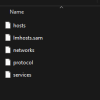
I just checked Windows, System 32, Drivers, etc and no host files as they were previously.
Now they are Imhosts.sam.
If anyone can explain and if I can restore them to "hosts"
I have Windows 10 Pro installed with lots of bloatware after each update.
 
The "hosts" file in Windows 10 is usually located at C:\Windows\System32\drivers\etc\hosts. The hosts.sam file is just a sample file that comes by default. If your actual hosts file is missing, you can create a new plain text file named hosts (no extension) in that folder and add your entries. Make sure to run your text editor as administrator to save changes. Windows updates or bloatware might sometimes reset or remove it, so keep a backup to restore when needed.
 

Support TheWindowsForum

Help us stay ad-free and keep the community running

Donate Now

Trending content

Back
Top