Follow along with the video below to see how to install our site as a web app on your home screen.
Note: This feature may not be available in some browsers.
Welcome to TheWindowsForum
Since 2010 — Over 15 years of helping Windows users worldwide.
Join thousands of Windows enthusiasts & IT pros. Ask questions, share tips, download resources,
and connect with the community — free and always friendly.
Yes — you can make Windows 11’s Start menu look and behave very close to the classic Windows 7 Start menu. Microsoft doesn’t offer this natively, but a few well-known tools do it extremely well.
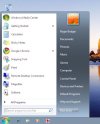
I downloaded `startallblack` and yes I got my start menu etc back to more like win7.
Thanks to those that suggested it, over the coming days I will see what else i can change.
I downloaded `startallblack` and yes I got my start menu etc back to more like win7.
Thanks to those that suggested it, over the coming days I will see what else i can change.
Glad to hear it worked for you
StartAllBack is a great choice if you’re coming from Windows 7.
Take your time exploring the settings—there are lots of nice tweaks you can apply to make Windows 11 feel much more familiar.
Feel free to share what else you discover or ask if you need any tips.
On the attached image how to I delete that `bookmark` horizontal bar underlined in red, to me it is just a duplicate of the bookmark menu on the left of page.
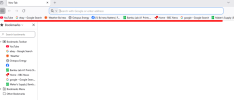
On the attached image how to I delete that `bookmark` horizontal bar underlined in red, to me it is just a duplicate of the bookmark menu on the left of page.View attachment 6899
That red-underlined bar is the Bookmarks Bar.
You can hide it by pressing Ctrl + Shift + B, or via the menu: Menu → Bookmarks → Show bookmarks bar (untick it).
This will only hide the horizontal bar—the bookmarks menu on the left will remain unchanged.
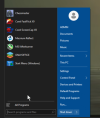
Classic Shell Reborn. Contribute to Open-Shell/Open-Shell-Menu development by creating an account on GitHub.
github.com
Try it today ""
Give the program a try, if you come across any errors, mistakes or things that may go wrong you can easily report it on the Github page.
Making statements
You have Open-Shell free and better than StartAllBack
like this is never a good idea. We can class this as SPAM or ADVERTISING, if you have something to share in future please ask the Forum owner.
If you have a proper homepage it would be useful to see that as well. This forum is to HELP people not have them searching their machine for things they havent got.
I have downloaded the program and will check it out and review it if needed.
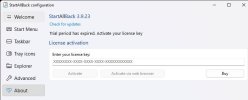
Having installed `start all black` a few months ago I now get this appearing when I boot up my pc, do I ignore this as its asking me for a licence key which I am not aware of.
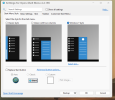
Having installed `start all black` a few months ago I now get this appearing when I boot up my pc, do I ignore this as its asking me for a licence key which I am not aware of.
I don't know how it will work. If you installed the "folk" version ..... I say 100 times that everything must be blocked using a firewall, otherwise the software goes to the Internet there, check if it is a legal version and if it is not, it ends up as a trial version or expires... This applies to ALL software. You have to block everything with a firewall. You have OpenShell free and it is better than yours.
This site uses cookies to help personalise content, tailor your experience and to keep you logged in if you register.
By continuing to use this site, you are consenting to our use of cookies.