website stat bro can someone just help me please | The Windows Forum
Install the app
How to install the app on iOS

Follow along with the video below to see how to install our site as a web app on your home screen.

Note: This feature may not be available in some browsers.

Welcome to TheWindowsForum

Since 2010 — Over 15 years of helping Windows users worldwide.

Join thousands of Windows enthusiasts & IT pros. Ask questions, share tips, download resources, and connect with the community — free and always friendly.

  • Post & reply in threads
  • Private message other members
  • Access exclusive guides & downloads
  • NO ADS for registered users

bro can someone just help me please

gus07555

New Member
Joined
Mar 12, 2026
Messages
3
Im trying to install cracked illustrator but every time i try to install the set-up thing, it justs give me this error:Captura de pantalla 2026-03-12 175816.png
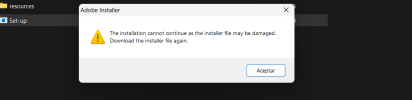
pls i knonw that it must be a common issue, so can someone pls help me (already tried with the wifi off, didnt work). If anyone helps me ill give you a reward
 
Im trying to install cracked illustrator but every time i try to install the set-up thing, it justs give me this error:View attachment 7021
pls i knonw that it must be a common issue, so can someone pls help me (already tried with the wifi off, didnt work). If anyone helps me ill give you a reward
Are you running it as admin?? AV turned off during install?? crack or no crack if this msg comes up it's generally the problem shown in the msg, it's a bad file... Might dump that and try something else.
 
Are you running it as admin?? AV turned off during install?? crack or no crack if this msg comes up it's generally the problem shown in the msg, it's a bad file... Might dump that and try something else.
hey venture, thanks fir answering. i cant run it as admin in windows 11, tried all the ways. And what do you mean by AV? Sorry im new at this
 
hey venture, thanks fir answering. i cant run it as admin in windows 11, tried all the ways. And what do you mean by AV? Sorry im new at this
AV = Anti-Virus. Keep in mind Windows Defender is active watching downloads even if you think you disabled it.

Disable real-time protection Windows Defender:
  1. Open Windows Security: Click the Start menu, type "Windows Security," and select the app.
  2. Access Settings: Click on Virus & threat protection, then click the Manage settings link under "Virus & threat protection settings".
  3. Toggle Protection: Set the Real-time protection toggle to Off.
  4. Confirm: Select "Yes" if asked by User Account Control.
Here's a YouTube video that explains it.

With all that being said, it still looks like your download was either damaged on the donor's system or was damaged during downloading. It happens often. See if you can find another source, disable defender and don't do any intensive work on the downloading system (your system)
 

Support TheWindowsForum

Help us stay ad-free and keep the community running

Donate Now

Trending content

Back
Top