- Thread Author
- #1
Follow along with the video below to see how to install our site as a web app on your home screen.
Note: This feature may not be available in some browsers.
Since 2010 — Over 15 years of helping Windows users worldwide.
Join thousands of Windows enthusiasts & IT pros. Ask questions, share tips, download resources, and connect with the community — free and always friendly.
| Modify Registry Settings | Open Registry Editor, navigate to Adobe folder, create DWORD value. |
| Adjust Application Preferences | Open Photoshop, go to Preferences, disable Sync Settings. |
I used this back in the day for just that kind of reason. I assume what you shared has the same approach; you control what talks and what does not. inbound and outboundNice, but all that setting in the registry and settings is complicated and unnecessary. You need a firewall that regulates traffic in real time. Nothing from Adobe except Node.js is allowed to go online.
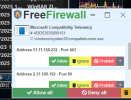
Kerio Personal Firewall 2007 year That's very old. FreeFirewall is relatively old but it works. There is also an older version of Comodo Firewall that does the same job and there is Minimal Firewall based on Windows Firewall with better control.. It is very difficult to find a quality firewall. All these modern ZoneAlarm or Comodo and the like don't warn you, they regulate everything themselves, and I don't want that. FreeFirewall and Minimal firewall are the best for now and the older Comodo firewall. I forgot to add that there is also Fort Firewall.I used this back in the day for just that kind of reason. I assume what you shared has the same approach; you control what talks and what does not. inbound and outbound
Kerio Personal Firewall
Kerio Personal Firewall Company: Kerio Technologies Inc. Author: -- (Liteware) (free for personal use) LFW (v 2.1.5) earlier version Windows OS: Windows 98/ME/NT/2000/XP Languages: English

I have never used Photoshop or anything from Adobe.Bless you guys for hanging there dealing with all these Photoshop problems.
I gave up a long time ago. You know the old saying, "When all else fails, read the directions". I'd like you add read then carefully and understand them completely and make sure you have completely turned off your antivirus, even though that's no longer totally possible with Windows Defender.
It's a very complicated crack the Adobe is trying to circumvent it all the time.