website stat Adobe Photoshop error installation | The Windows Forum
Install the app
How to install the app on iOS

Follow along with the video below to see how to install our site as a web app on your home screen.

Note: This feature may not be available in some browsers.

Welcome to TheWindowsForum

Since 2010 — Over 15 years of helping Windows users worldwide.

Join thousands of Windows enthusiasts & IT pros. Ask questions, share tips, download resources, and connect with the community — free and always friendly.

  • Post & reply in threads
  • Private message other members
  • Access exclusive guides & downloads
  • NO ADS for registered users

Adobe Photoshop error installation

ARK1678

New Member
Joined
Jul 3, 2026
Messages
1

Adobe Photoshop 2026 v27.0 (x64) FULL [TheWindowsForum], tried to install this torrent on my pc, follow all the steps genuinely,but still it gives the "sign in" thing, when I open the app. Tried to put even an outbound rule in windows defender firewall, but it doesn t work.​

 
Search Assist
To stop the Adobe Photoshop sign-in prompt, you can disable the Adobe ID sign-in pop-up by going to the Registry Editor and modifying settings, or by adjusting preferences in the application to turn off sync settings. Disabling these features will help prevent the sign-in requests.

Disabling Adobe Photoshop Sign-In Prompts

To stop the Adobe Photoshop sign-in prompt, you can follow these methods:

Method 1: Modify Registry Settings

  1. Open Registry Editor:
    • Press the Windows key and type Regedit, then press Enter.
  2. Navigate to Adobe Folder:
    • Go to the following path:

      HKEY_CURRENT_USER > Software > Adobe > Photoshop
  3. Create a New DWORD Value:
    • Right-click in the right panel, select New, then choose DWORD (32-bit) Value.
    • Name it appropriately to disable the sign-in prompt.
  4. Save Changes:
    • Click OK and close the Registry Editor.
    • Restart your computer to apply the changes.

Method 2: Adjust Application Preferences

  1. Open Adobe Photoshop:
    • Launch the application.
  2. Access Preferences:
    • Go to Edit > Preferences.
  3. Disable Sync Settings:
    • Find the option related to Adobe Online Services and uncheck the box next to Sync Settings.
  4. Save and Restart:
    • Click OK to save changes and restart Photoshop.

Summary of Steps


Modify Registry SettingsOpen Registry Editor, navigate to Adobe folder, create DWORD value.
Adjust Application PreferencesOpen Photoshop, go to Preferences, disable Sync Settings.


By following these methods, you should be able to stop the Adobe Photoshop sign-in prompts effectively.

DuckDuckGo Search "how to stop adobe photoshop "sign in" thing" gave this step-by-step suggestion
 
Last edited:
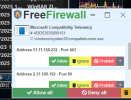
Nice, but all that setting in the registry and settings is complicated and unnecessary. You need a firewall that regulates traffic in real time. Nothing from Adobe except Node.js is allowed to go online.
 
Nice, but all that setting in the registry and settings is complicated and unnecessary. You need a firewall that regulates traffic in real time. Nothing from Adobe except Node.js is allowed to go online.
I used this back in the day for just that kind of reason. I assume what you shared has the same approach; you control what talks and what does not. inbound and outbound

Kerio Personal Firewall​


Kerio Personal Firewall Company: Kerio Technologies Inc. Author: -- (Liteware) (free for personal use) LFW (v 2.1.5) earlier version Windows OS: Windows 98/ME/NT/2000/XP Languages: English
 
I used this back in the day for just that kind of reason. I assume what you shared has the same approach; you control what talks and what does not. inbound and outbound

Kerio Personal Firewall​


Kerio Personal Firewall Company: Kerio Technologies Inc. Author: -- (Liteware) (free for personal use) LFW (v 2.1.5) earlier version Windows OS: Windows 98/ME/NT/2000/XP Languages: English
Kerio Personal Firewall 2007 year That's very old. FreeFirewall is relatively old but it works. There is also an older version of Comodo Firewall that does the same job and there is Minimal Firewall based on Windows Firewall with better control.. It is very difficult to find a quality firewall. All these modern ZoneAlarm or Comodo and the like don't warn you, they regulate everything themselves, and I don't want that. FreeFirewall and Minimal firewall are the best for now and the older Comodo firewall. I forgot to add that there is also Fort Firewall.

It is precisely because all those expensive cracked applications go to the Internet to be checked that it is most important to have a firewall.
Microsoft Telemetry.png
 
Bless you guys for hanging there dealing with all these Photoshop problems.
I gave up a long time ago. You know the old saying, "When all else fails, read the directions". I'd like too add read then carefully and understand them completely and make sure you have completely turned off your antivirus, even though that's no longer totally possible with Windows Defender.
It's a very complicated crack the Adobe is trying to circumvent it all the time.
 
Bless you guys for hanging there dealing with all these Photoshop problems.
I gave up a long time ago. You know the old saying, "When all else fails, read the directions". I'd like you add read then carefully and understand them completely and make sure you have completely turned off your antivirus, even though that's no longer totally possible with Windows Defender.
It's a very complicated crack the Adobe is trying to circumvent it all the time.
I have never used Photoshop or anything from Adobe.
 

Support TheWindowsForum

Help us stay ad-free and keep the community running

Donate Now

Trending content

Back
Top