website stat After the recent Windows 11 25h2 update when i shut down my computer | The Windows Forum
Install the app
How to install the app on iOS

Follow along with the video below to see how to install our site as a web app on your home screen.

Note: This feature may not be available in some browsers.

Welcome to TheWindowsForum

Since 2010 — Over 15 years of helping Windows users worldwide.

Join thousands of Windows enthusiasts & IT pros. Ask questions, share tips, download resources, and connect with the community — free and always friendly.

  • Post & reply in threads
  • Private message other members
  • Access exclusive guides & downloads
  • NO ADS for registered users

After the recent Windows 11 25h2 update when i shut down my computer

AFFASocial

Ultimate Donator
VIP
Joined
Jun 26, 2021
Messages
1,247
After the most recent update I noticed when I wake up my computer has booting up sometime during the night hours or wee hours. I did some searches but found no specific answer to why it reboots eventually after a shutdown. All my shit is turned off, like Wake-on-LAN, etc. only thing that changed was the UPDATE. Who can tell me how to fix this before I do a fresh install of the 26H2 if it is available?
 
Here are my thoughts. If the system is truly powered down, it has to be the BIOS. The O/S is sitting on the hard drive, not resident in the system. So that leaves the BIOS. The BIOS is always "powered on", when you press the power button it triggers the BIOS to load the O/S into the system, blah, blah.
So by deduction, the BIOS is triggering the "on" event since it's always active and has power being applied to it. By taking it to the worst it could be, the system powers on, loads Windows (or whatever) and so on.
From what you wrote, the BIOS event powers the system on and then loads Windows and the O/S may go off and do who knows what.
I would first reset the BIOS to factory defaults, flash it with the latest revision to clear the BIOS of whatever corruption it may have encountered. So obviously Windows fouled up the BIOS so...
I would do a clean install, you have been around the block and know how to disinfect a corrupted Windows environment. Either way I think that's the root of your problem and it may (and probably) would reappear.
I would suspect it's a pretty sophisticated infection to do such harm. I would also be worried what exactly this system was doing during it's nightly travels.
I could be 100% wrong, this is nothing but a guess based on the habits you report your machine is doing.
Please complete the story and let us know what you ultimately find out
 
It's kind of weird; I did a fresh install and this morning it was booted and in sleep mode i have reset the BIOS. The funny thing is I dont remember changing anything in the BIOS. Anyway, I will report how this goes tomorrow.
 
After the most recent update I noticed when I wake up my computer has booting up sometime during the night hours or wee hours. I did some searches but found no specific answer to why it reboots eventually after a shutdown. All my shit is turned off, like Wake-on-LAN, etc. only thing that changed was the UPDATE. Who can tell me how to fix this before I do a fresh install of the 26H2 if i

It's kind of weird; I did a fresh install and this morning it was booted and in sleep mode i have reset the BIOS. The funny thing is I dont remember changing anything in the BIOS. Anyway, I will report how this goes tomorrow.
is your computer really rebooting from a shutdown? or was it in a sleep state?
my computers do wake from sleep ,and I understand they are exiting sleep mode entering hybernation (deep sleep?)...
 
It's kind of weird; I did a fresh install and this morning it was booted and in sleep mode i have reset the BIOS. The funny thing is I dont remember changing anything in the BIOS. Anyway, I will report how this goes tomorrow.
I am dying to find out what you find.
The place I work for is very reluctant to even think about upping to 25H2. I am going to wait as well. Windows is buggy as all get out in the past year or so. Quality assurance seems to have swirled down the drain at Microsoft. Get rid of paid personnel and let the users sort it out in the field. Temporarily raises the bottom line and gets the CEO big bonuses while customer confidence and satisfaction is no longer considered.
Tim Cook is retiring from Apple, let's see if Apple goes the way of Microsoft after Gates retired.
 
Last edited:
OK, here it is.

Evidently, one time when I shut down this box, I held the power button for 30 seconds, but it did not power down completely even though it acted like it did. I had to hold the power button for a minute or longer. Once I did this, it was SOLVED. It was stuck in the mode to restart the box, and now that I did this and let it sit for almost 2 hours to see if it rebooted, it did not. = SOLVED
 
I also had Wake on LAN enabled .

Today I fired up a NEW PC
I installed the New Windows 11 Pro 26H1

Processor 12th Gen Intel(R) Core(TM) i9-12900H (4.50 GHz)
Installed RAM 32.0 GB (31.7 GB usable)
 
is your computer really rebooting from a shutdown? or was it in a sleep state?
my computers do wake from sleep ,and I understand they are exiting sleep mode entering hybernation (deep sleep?)...
It was rebooting from a shutdown completely turned off, and when I woke up, it was rebooted and in safemode. When I wake up, I just press the power button to wake it, and I tried everything, even resetting the box, which I thought I FIXED. The box works fine but will not stay shut down. Well, it shuts down but eventually reboots . So a new box and no such issue—it could still be a setting, but since I had a new unopened box, I just fired it up and installed the Windows 11 Pro 26H1
 
BIOS

Apparently it has come to my attention that MICROSOFT in there infinatesimal wisdom (that of an aomeba) have taken it upon themselves to assist certain manufacturers of components by including (SIT DOWN FOR THIS) Bios updates for your motherboard that get put into theupdate queue and often sit there.

Obviously when they do this they pay no attention to what else is in the system. Alienware machinery is being Bricked, once again BOTLOCKER is being activated whether you want it or not.

I would suggest you clear your update queue out completely.
 
BIOS

Apparently it has come to my attention that MICROSOFT in there infinatesimal wisdom (that of an aomeba) have taken it upon themselves to assist certain manufacturers of components by including (SIT DOWN FOR THIS) Bios updates for your motherboard that get put into theupdate queue and often sit there.

Obviously when they do this they pay no attention to what else is in the system. Alienware machinery is being Bricked, once again BOTLOCKER is being activated whether you want it or not.

I would suggest you clear your update queue out completely.
Tell us where this is located in Windows. "I would suggest you clear your update queue out completely." I retired the other box. I reset it; I unchecked all the wake-on settings in the BIOS. And it kept waking from a sleep mode and changed everything, like what happens when I close the lid. I set it so when I press the sleep button it does nothing, and when I press the power button, it shuts down. The box started acting weird, like the lights on the box after I reset and powered it on. All the lights will all be off, and then after I shut it down the next day, the system is in a safe mode and all the lights are on, so it has issues; that's why I retired it. In the old system, everything works perfectly except that auto-reboot-to-sleep-mode issue.
 
C:\WINDOWS\SoftwareDistribution\Download

Enter the directory.

Press CTRL + A (select all)

Press DELETE or right click and select delete.

This is the downloaded location cache area. Sometimes they are named correctly sometimes not. But clear the cache, restart your machine and then run windows update again. Anything in the list that says BIOS uncheck it.

Up to you if you want to go to the manufacturers website and get the latest BIOS update from there.

According to a tech release the one MS want to put in is a generic non specific one to cure a BITLOCKER problem. Go into sewttings and DISABLE BITLOCKER IN THE SETTINGS. leave it for a few minnutes after its been disabled for it to disarm, then restart

Microsoft once again are in NANNY, and Nanny says you need to have Bitlocker active. If it fails it Bricks your hard drive. If its active already then find the KEY. Make a note of it, the only place on your machine where this piece of junk is stored is in the TPM module. The drive is bricked if you remove it and try to use it on another machine.
 
C:\WINDOWS\SoftwareDistribution\Download

Enter the directory.

Press CTRL + A (select all)

Press DELETE or right click and select delete.

This is the downloaded location cache area. Sometimes they are named correctly sometimes not. But clear the cache, restart your machine and then run windows update again. Anything in the list that says BIOS uncheck it.

Up to you if you want to go to the manufacturers website and get the latest BIOS update from there.

According to a tech release the one MS want to put in is a generic non specific one to cure a BITLOCKER problem. Go into sewttings and DISABLE BITLOCKER IN THE SETTINGS. leave it for a few minnutes after its been disabled for it to disarm, then restart

Microsoft once again are in NANNY, and Nanny says you need to have Bitlocker active. If it fails it Bricks your hard drive. If its active already then find the KEY. Make a note of it, the only place on your machine where this piece of junk is stored is in the TPM module. The drive is bricked if you remove it and try to use it on another machine.
Thanks but in my case on the old box even after a fresh install it keeps coming on eventually after a shutdown, and the fact is the power button and the lights were acting weird or broken, which led me to retire the old box I left it with a fresh install and everything st up so it can be used as a backup, next time i fire it up will do do what you suggested and see what happens.....
 
I am on the old BOX with the suggested changes edits also reset the BIOS and unchecked the wake on options I will let you know how it goes tomorrow after i shut the system down and see if it is awake in a safe mode state.

Also did some of this

1. Disable Fast Startup (Most Common Fix)
Fast Startup can cause Windows to wake up instantly.
  • Open the Control Panel.
  • Select Power Options.
  • Click "Choose what the power buttons do" on the left pane.
  • Click "Change settings that are currently unavailable" (requires admin rights).
  • Uncheck "Turn on fast startup (recommended)".
  • Save changes and shut down.
    DellDell +2

2. Disable Wake-on-LAN and Device Wake
Peripherals like your mouse or Ethernet cable might be waking the PC.
  • Right-click the Start button and select Device Manager.
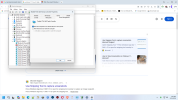
  • Expand Network adapters, right-click your network card (e.g., Intel Ethernet, Realtek), and pick Properties. Under the Power Management tab, uncheck "Allow this device to wake the computer".
  • Repeat this for your Keyboard and Mice in their respective categories.
    Microsoft LearnMicrosoft Learn

3. Disable Wake Timers
  • Open Control Panel > Power Options.
  • Click "Change plan settings" next to your active plan.
  • Click "Change advanced power settings".
  • Expand Sleep > Allow wake timers and set it to Disable.
    Microsoft LearnMicrosoft Learn +3

4. Other Potential Fixes
  • Check Command Prompt: Run powercfg -devicequery wake_armed to see what devices can wake the PC, or powercfg -lastwake to see what woke it last.
  • Disable Hybrid Sleep: Under Power Options > Advanced Settings, turn off hybrid sleep.
  • Check BIOS/UEFI: Enter your BIOS/UEFI (usually F2, F12, or Del at startup) and disable options like "Wake on LAN," "Power on by PCIe," or "Automatic Power On".
  • Update Drivers: Faulty drivers, particularly for the chipset or networking components, can cause this behavior.
    FacebookFacebook +4
If the issue persists, a full system shut down by holding the power button for 5-10 seconds, or a complete power drain (unplugging for 30 seconds), can sometimes break
 
Last edited:
I just decided to buy another Mini PC GMKtec Gaming PC, K11 AMD Ryzen 9 8945HS(8C16T, Up to 5.2GHz), 32GB DDR5 RAM 1TB cant wait to test this one for sure :) on Amazon its $749.00 I got it new for $384.00 :)

 
What I discovered as the fix

Edit Power plan
Then change advanced power settings
then click sleep
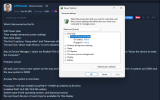
The first 2 options, "sleep after" and "hibernate after," are set to "never."
The last one, "allow wake timers," is set to disabled.

Also in Device Manager, I select my Realtek PCIe GbE Family Controller, then under power management, uncheck "Allow the device to wake the computer."

Problem solved

Oh well, now I have a new system on the way and have 3 working systems similar to the recent purchase. The other 3 systems are DDR4 and the new system is DDR5

Anyway this system is now fixed.

Processor 11th Gen Intel(R) Core(TM) i9-11900H @ 3.50GHz (3.50 GHz)
Installed RAM 16.0 GB (15.8 GB usable)
System type 64-bit operating system, x64-based processor
Pen and touch No pen or touch input is available for this display


Screenshot (2).png

Screenshot (3).png
 
What I discovered as the fix

Edit Power plan
Then change advanced power settings
then click sleep
The first 2 options, "sleep after" and "hibernate after," are set to "never."
The last one, "allow wake timers," is set to disabled.

Also in Device Manager, I select my Realtek PCIe GbE Family Controller, then under power management, uncheck "Allow the device to wake the computer."

Problem solved

Oh well, now I have a new system on the way and have 3 working systems similar to the recent purchase. The other 3 systems are DDR4 and the new system is DDR5

Anyway this system is now fixed.

Processor 11th Gen Intel(R) Core(TM) i9-11900H @ 3.50GHz (3.50 GHz)
Installed RAM 16.0 GB (15.8 GB usable)
System type 64-bit operating system, x64-based processor
Pen and touch No pen or touch input is available for this display


View attachment 7050

View attachment 7051
I set similar settings, i also set "turn off hard drive after x minutes to 0:

1774940803393.png
 

Support TheWindowsForum

Help us stay ad-free and keep the community running

Donate Now

Trending content

Back
Top