website stat Chrome Issue | The Windows Forum
Install the app
How to install the app on iOS

Follow along with the video below to see how to install our site as a web app on your home screen.

Note: This feature may not be available in some browsers.

Welcome to TheWindowsForum

Since 2010 — Over 15 years of helping Windows users worldwide.

Join thousands of Windows enthusiasts & IT pros. Ask questions, share tips, download resources, and connect with the community — free and always friendly.

  • Post & reply in threads
  • Private message other members
  • Access exclusive guides & downloads
  • NO ADS for registered users

Chrome Issue

deejaymj

Member
Joined
Nov 6, 2025
Messages
10
Good Evening Dear All

i have download the google chrome but its showing me this error and i have turn off the firewall and my network is working fine too but its shows same again & i try to do in run in admin but its same !! Is there any solutions for this app like CMD or something else ....

waiting for your response guys

thanks and appreciate it
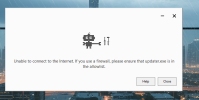
1767533394482.png
 
You should not need to turn off the firewall to install Chrome, unless it is for a preferred reason. I only use Chrome for one reason, to make my auto post on my website. TRY Opera it is a better browser anyway.
 
You should not need to turn off the firewall to install Chrome, unless it is for a preferred reason. I only use Chrome for one reason, to make my auto post on my website. TRY Opera it is a better browser anyway.
thank u @AFFASocial yes u r right opera is better but i want to know what is the reason its shows this ?
 
Good Evening Dear All

i have download the google chrome but its showing me this error and i have turn off the firewall and my network is working fine too but its shows same again & i try to do in run in admin but its same !! Is there any solutions for this app like CMD or something else ....

waiting for your response guys

thanks and appreciate it

View attachment 6904
This issue is usually not related to the firewall itself, even if it’s turned off. It’s often caused by one of the following:


  1. Proxy settings configured incorrectly
  2. DNS or network stack corruption
  3. Antivirus or security software still blocking the updater in the background
  4. A corrupted Chrome installer

You can try the following steps:


  1. Reset proxy settings
    Open CMD as Administrator and run:


  1. Reset network stack
    In CMD (Admin):


Then restart the PC.


  1. Download the offline installer
    Instead of the normal installer, download the Chrome offline installer directly from Google:
  2. Temporarily disable antivirus completely (not just firewall) and try again.
  3. Make sure updater.exe / setup.exe is not blocked in:

  • Antivirus quarantine
  • Windows Defender “Controlled folder access”
  • Any third-party security tool

Running as administrator alone usually doesn’t fix this problem.
 
In Windows Security Tab, Then App & Browser Control, then Smart App Controller Settings Try turning it off then try what you're trying to do. I suspect it will work then.
 
Before you go any further wiht this I would like to know "WHERE YOU GOT THE DOWNLOAD FOR GOOGLE CHROME FROM, Please."

Opera is a skin for chrome , it isnt different it isnt a different operator its a skin.

As is Opera GX which is a lot better to use and work with.

Chrome lockout only occurs if some kind and well meaning individual ahs planted a hacked version of the installer on a web site and given it a ghost address link.

I had hoped that children and College undergraduates had grown out of this childish behaviour by now, seems not.
 
@Diguelo Well the thing was i have Reset proxy settings by using the app called Net Adapter
and then work automatically it work and then i download original version of google chrome and i was afraid that's because of windows issue nowadays you never knew windows updates is crazy anyhow its worked
 
Why would you need to reset the proxy settings?

Change the DNS yes but proxy is something Ive never had to do in the UK, other than routing in a University once.

I am assuming of course that your connection to the internet is through a Router plugged into a wire outside of your property and you are not on a multiband shared connection.

Please clarify your connection, most people connect to the internet via a router or wifi and router setup.
 
Good Evening Dear All

i have download the google chrome but its showing me this error and i have turn off the firewall and my network is working fine too but its shows same again & i try to do in run in admin but its same !! Is there any solutions for this app like CMD or something else ....

waiting for your response guys

thanks and appreciate it

View attachment 6904
you shoukd download the latest version
 

Support TheWindowsForum

Help us stay ad-free and keep the community running

Donate Now

Trending content

Back
Top