website stat ERROR 182 Adobe illustrator | The Windows Forum
Install the app
How to install the app on iOS

Follow along with the video below to see how to install our site as a web app on your home screen.

Note: This feature may not be available in some browsers.

Welcome to TheWindowsForum

Since 2010 — Over 15 years of helping Windows users worldwide.

Join thousands of Windows enthusiasts & IT pros. Ask questions, share tips, download resources, and connect with the community — free and always friendly.

  • Post & reply in threads
  • Private message other members
  • Access exclusive guides & downloads
  • NO ADS for registered users

ERROR 182 Adobe illustrator

unejs

New Member
Joined
Aug 27, 2026
Messages
2
IM new to this and i disable my antivirus i tried to install like this and i run admin and still i get this error how do i fix cuz i need it for school
1787843125386.png
 
Welcome to the Forums

To resolve error code 182 while installing Illustrator, try changing the installation language to English (North America) or moving the installation folder to a simpler path, such as the Desktop. Additionally, ensure your Windows operating system is up to date and that you have the necessary permissions.

partitionwizard.com Adobe

Troubleshooting Error Code 182 for Illustrator Installation​

Error code 182 can occur during the installation of Adobe Illustrator due to various reasons. Here are some effective solutions to resolve this issue.

Change Installation Language​

  • Switch Language: Change the installation language to English (North America) or English (International). This has helped many users successfully complete their installations.

Simplify Installation Path​

  • Move Installation Folder:
    • Navigate to the location of your Adobe installation files.
    • Move the installation folder to a simpler path, such as the Desktop.
    • Rename the folder to something straightforward, like Adobe_Install.

Update Windows​

  • Check for Updates: Ensure your Windows operating system is up to date. An outdated OS can lead to installation issues.

Permissions and Access​

  • Verify Permissions: Make sure you have the necessary permissions to install software on your computer. If you are using a corporate or school PC, strict user account controls may be in place.

Summary of Steps​

StepAction
Change LanguageSet to English (North America)
Move Installation FolderPlace in a simple path (e.g., Desktop)
Update WindowsEnsure your OS is current
Check PermissionsVerify you have installation rights
By following these steps, you should be able to resolve error code 182 and successfully install Adobe Illustrator.
 
Welcome to the Forums

To resolve error code 182 while installing Illustrator, try changing the installation language to English (North America) or moving the installation folder to a simpler path, such as the Desktop. Additionally, ensure your Windows operating system is up to date and that you have the necessary permissions.

partitionwizard.com Adobe

Troubleshooting Error Code 182 for Illustrator Installation​

Error code 182 can occur during the installation of Adobe Illustrator due to various reasons. Here are some effective solutions to resolve this issue.

Change Installation Language​

  • Switch Language: Change the installation language to English (North America) or English (International). This has helped many users successfully complete their installations.

Simplify Installation Path​

  • Move Installation Folder:
    • Navigate to the location of your Adobe installation files.
    • Move the installation folder to a simpler path, such as the Desktop.
    • Rename the folder to something straightforward, like Adobe_Install.

Update Windows​

  • Check for Updates: Ensure your Windows operating system is up to date. An outdated OS can lead to installation issues.

Permissions and Access​

  • Verify Permissions: Make sure you have the necessary permissions to install software on your computer. If you are using a corporate or school PC, strict user account controls may be in place.

Summary of Steps​

StepAction
Change LanguageSet to English (North America)
Move Installation FolderPlace in a simple path (e.g., Desktop)
Update WindowsEnsure your OS is current
Check PermissionsVerify you have installation rights
By following these steps, you should be able to resolve error code 182 and successfully install Adobe Illustrator.
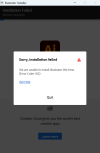
i did them all but still goes to 5% then it says error
 
Also remember importnat, The file string length including drive letter, folders and file names plus extensions cannot excedd 256 characters. Adobe love to mess you about like this in case you tear their installer apart.

Download the Illustrator installation file again and delete the old one. Make sure to let it FULLY complete, then right click and install it using "Run as Administrator" this will help file names and other things to achieve the correct stability.
 

Support TheWindowsForum

Help us stay ad-free and keep the community running

Donate Now

Trending content

Back
Top