website stat Problem with Hyper-V virtual machine | The Windows Forum
Install the app
How to install the app on iOS

Follow along with the video below to see how to install our site as a web app on your home screen.

Note: This feature may not be available in some browsers.

Welcome to TheWindowsForum

Since 2010 — Over 15 years of helping Windows users worldwide.

Join thousands of Windows enthusiasts & IT pros. Ask questions, share tips, download resources, and connect with the community — free and always friendly.

  • Post & reply in threads
  • Private message other members
  • Access exclusive guides & downloads
  • NO ADS for registered users

Problem with Hyper-V virtual machine

Harald Gottfried

New Member
Joined
Aug 7, 2025
Messages
2
Hi!
I need your help.
Last night, I was working on a virtual machine when the power suddenly went out. After this unexpected shutdown, I can no longer start my virtual machine Hyper-V on Windows 10. It contains very important files.
Has anyone experienced a similar issue and knows how to recover the virtual machine or at least retrieve the data from it?
Unfortunately, I didn’t make any backups and never thought something like this could happen...
I’d be very grateful for any advice or assistance!
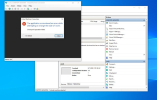
Screenshot_5.png
 
I tried countless solutions, including restoring the virtual machine with the same configurations. After rebuilding, the error disappeared, but the virtual machine still wouldn’t start. A window would briefly open and then immediately close.


However, I finally found a way to recover my files using Hetman Partition Recovery. I mounted the virtual disk “windows10.vhdx” in the program, scanned it for available files, and successfully saved them to a USB flash drive. After that, I immediately created several backups and uploaded them to cloud storage.


P.S. Always make backups — anyone can find themselves in a similar situation.


For those interested, here’s the article that helped me:

https://hetmanrecovery.com/recovery...hyper-v-server-hypervisor-virtual-machine.htm
 
VHD files, been a while since I made one apart from my bombproof Windows ME one for XP based gaming.

Ive had power outages usually caused by getting too engrossed in a game and not watching the clock. late for work power button hit.

Generally I have issues trying to log back into it, but if I boot in safe mode and use the DOS command SHUTDOWN. This usually resets the drive to the boot block next time i boot in and all is back to normal.

SHUTDOWN surprisingly still work on NAS, M.2 and a host of drives to reset the head position to a safe zone on spinning platter drives.

Other fixes. There used to be an initialiser for VHD files included in most VHD software. I still use VMPLAYER and im going back some years now when parralel drives were around.
 

Support TheWindowsForum

Help us stay ad-free and keep the community running

Donate Now

Trending content

Back
Top