website stat Question Windows eject drives | The Windows Forum
Install the app
How to install the app on iOS

Follow along with the video below to see how to install our site as a web app on your home screen.

Note: This feature may not be available in some browsers.

Welcome to TheWindowsForum

Since 2010 — Over 15 years of helping Windows users worldwide.

Join thousands of Windows enthusiasts & IT pros. Ask questions, share tips, download resources, and connect with the community — free and always friendly.

  • Post & reply in threads
  • Private message other members
  • Access exclusive guides & downloads
  • NO ADS for registered users

Question Windows eject drives

cloudff7

Member
Joined
Nov 29, 2024
Messages
17
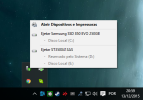
Does Windows send any command to the 2.5" HDD + USB 3.0 enclosure case after ejecting "safely remove hardware" and without disconnecting the USB 3.0 cable after ejecting in Windows?
 

Attachments

  • ejetar4.png
    ejetar4.png
    90.7 KB · Views: 1
DO NOT UNPLUG A INTERNAL HARD DRIVE OR SSD WHILST THE MACHINE IS POWERED ON UNDER ANY CIRCUMSTANCES.

The remove drives safely is a throwback to the early days of ZIP Drives (240Mb diskettes) type 1.0 USB drives and early 2.0 USB drives. WHilst the electronics were basic, the throwback to the eject button was hard to implment and destroyed a load of type 1.0 drives necause the drive was yanked from the holder and didnt keep a power connection going internally. If you look inside the USV socket you will see the two DAYA connection contacts are shorter and set nack into the sockey now. This means as the drive is removed the DATA lines disconnect first then the power lines, thus in the micro second as disconnection is done it severs the link between PC and stick before ot tirns the stick off.

M.2, SSD and HDD drives do not posess this and you will either destroy them or damage the data area because the head wont move back to thier safe area. Power cuts can cause the same issues on older drives.

USB 3 connections have a backup power system to allow the safe state to go ahead even if the power connection is broken. Ext drives and M.2 connections outside the machine have a bank of capacitors in the interface to allow this to occur.

Your image is a good trait to follow and sadly these days not many follow the procedure. just dont unplug any internal drives whildt the machine is powered on. Or get to know a guy who can do data recovery if you do.

DO NOT UNPLUG A INTERNAL HARD DRIVE OR SSD WHILST THE MACHINE IS POWERED ON UNDER ANY CIRCUMSTANCES.
 
Last edited:
Whoa replying from your phone? No such thing as USV and DAYA. I take it it was supposed to be USB and DATA.
Safely remove hardware was implemented to make sure all the write buffer sending data to the removable is empty to prevent data loss. It has nothing to do with the attached device. You are correct no park the head to magnetic aka spinner 2 1/2 and 3 1/2 inch hard drives is issued. Honestly I fail to see what harm disconnecting SSD and flash drives after issuing this command.
Modern hard drives include a head parking routine in their firmware so it's not an issue as well.

Why manual commands are no longer needed
For decades, head parking was a necessary, manual step for older mechanical hard disk drives to prevent damage during movement or power loss.
  • Automatic protection: Modern hard drives use built-in sensors to detect sudden motion or power loss. In response, they automatically retract and lock the read/write heads to a secure "landing zone," or an area off the data platters.
In fact, avoid having USB drives attached when cold booting. On some systems there may be an inrush of current which potentially could damage the drive. Be especially careful when updating drivers or flashing the BIOS for the same reason, in both scenarios an inrush of current is quite possible.
 
Ive had lots of jobs in the past from USB 1.0 removal and internal P, S, and SATA drives that got pulled by some clever techs.

" No such thing as USV and DAYA" Ah there is when your illuminated Keyboard is once again having an off day and the Braile pips have mostly worn away. The land of TYPO is a wonderous place to visit occasionally.

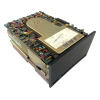
Drive Disco was a good money spinner to be fair. I failed to see why someone had to disconnect a drive while the power was on then whine like hell that it got corrupted. And Im talking 40MB to 100MB door stop drives back in the days of Win 3.0 3.1 and 3.11. The Os was super stable most of the time, pity the builders werent. However we all had to make a start somewhere.
1759650235726.png

Ah the memories come flooding back. "What you mean it was my fault it died" and other classic excuses. I used to have to strip these things down and remount the platters in a working frame and gubins to get back the lost data. Built like Bricks and tech like this was my teeth cutting time.

The USB slots on type 1.0 used to have contacts all the same length, then on 2.0 they trimmed the data lines about a millimeter shorter than power connectors, so the data stopped handshaking and the file was closed. As USB devices grew up they had a better onboard power storage that prevented data loss on disconnection.

{wanders off down the long dark corridor to the den, somewhere in the dark a door closes}
 

Support TheWindowsForum

Help us stay ad-free and keep the community running

Donate Now

Trending content

Back
Top