oldgeek
Well-Known Member
- Joined
- Aug 25, 2021
- Messages
- 69

- Thread Author
- #1
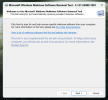
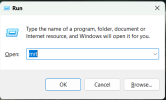
In Windows 11 (not sure about 10) if you open up the run commend by pressing the windows key + R you will get a small window opening. Now it mazu ask your permission to run. Give permission for it to run, it doesn't do anything until you tell it. Once open, you will see it is a malicious file scanner.
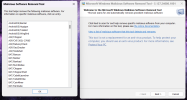
If you click on the the blue link that states see the list of malicious software this tool will see, you can see the large number of files it covers. Go back to the first screen and select next. You can then choose the type of scan to select. If you choose all the files, it will take a little time to work through them.
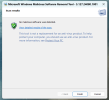
Now it may detect a file it cannot disinfect, if it is not important, then simply delete it. It will name the file for you so you can look for software that will clean it.
A screen shot of the windows you should see are attached.
If you click on the the blue link that states see the list of malicious software this tool will see, you can see the large number of files it covers. Go back to the first screen and select next. You can then choose the type of scan to select. If you choose all the files, it will take a little time to work through them.
Now it may detect a file it cannot disinfect, if it is not important, then simply delete it. It will name the file for you so you can look for software that will clean it.
A screen shot of the windows you should see are attached.