website stat Win7 PC fail to boot. | The Windows Forum
Install the app
How to install the app on iOS

Follow along with the video below to see how to install our site as a web app on your home screen.

Note: This feature may not be available in some browsers.

Welcome to TheWindowsForum

Since 2010 — Over 15 years of helping Windows users worldwide.

Join thousands of Windows enthusiasts & IT pros. Ask questions, share tips, download resources, and connect with the community — free and always friendly.

  • Post & reply in threads
  • Private message other members
  • Access exclusive guides & downloads
  • NO ADS for registered users

Win7 PC fail to boot.

juco

Active Member
Joined
Apr 1, 2025
Messages
31
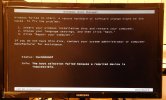
The image shows the error I get when trying to boot.
I tried my win7 boot disc.....nothing.
I tried to boot to safe mode.....nothing
I do have a Macrium image back up but yet to try but suspect it will also fail.
Any suggestions to get a restore?

I should add I have a win 11 which I now use but if possible I would like the win7 as a back up for printing documents.
DSCN3938.JPG
 
Win 7 boot disk, not working? Something is amiss my friend. It's kind of odd you would have a number of failures at once. Any chance you can get access to another boot disk? Is whatever you are reading the boot disk in good order? A malfunctioning ROM device can affect the whole bus which might be the source of all your problems. I would run some good system diagnostics first before proceeding with other remedies.
 
In the past when my Windows 7 did this, I would boot to command prompt for that drive, for example, c:\, then type fixboot, let it finish, and then when that is done, type fixmbr, and when that is done, reboot. This always fixed the boot issue for Windows 7. If that does not work, I would suspect the drive is going bad. You can put the drive in a docking station to access the drive and recover any files before retiring the drive.

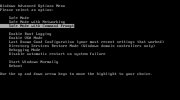
Usually tapping the F8 key during boot-up will give you the prompt window so you can select the command prompt to then run the commands.

To run the fixboot and fixmbr commands in Windows 7, boot from the Windows installation media, select "Repair your computer," then choose "Command Prompt." In the Command Prompt, type bootrec /fixmbr and press Enter, followed by bootrec /fixboot and press Enter again to execute the commands.

Also see this


Also see this


Also in your case, remove the CMOS battery for a minute or 2, then put it back in, and then when booting, try the F8 key during boot; if it goes straight into CMOS BIOS, Make sure your drive is set to the 1st boot. Change the date and time, then reboot, and then keep tapping the F8; you should get prompt windows to select boot to command prompt.

xp-pc-command-boot.jpg

Then you run the fixboot and fixmbr commands

Good luck; hope your drive has not gone bad.
 
Last edited:
Thanks for the replies I'll keep trying over the next few days, I will also give the CMOS battery a try.
If the drive has gone bad I do have all my important files / documents backed up on external drives x 2.
 
Thanks for the replies I'll keep trying over the next few days, I will also give the CMOS battery a try.
If the drive has gone bad I do have all my important files / documents backed up on external drives x 2.
Best of luck Juco.
If things don't work out, come back when you have more info. Kind of hard to give you help without knowing more.
 

Support TheWindowsForum

Help us stay ad-free and keep the community running

Donate Now

Trending content

Back
Top