How to install the app on iOS
Follow along with the video below to see how to install our site as a web app on your home screen.
Note: This feature may not be available in some browsers.
Welcome to TheWindowsForum
Since 2010 — Over 15 years of helping Windows users worldwide.
Join thousands of Windows enthusiasts & IT pros. Ask questions, share tips, download resources, and connect with the community — free and always friendly.
- Post & reply in threads
- Private message other members
- Access exclusive guides & downloads
- NO ADS for registered users
You are using an out of date browser. It may not display this or other websites correctly.
You should upgrade or use an alternative browser.
You should upgrade or use an alternative browser.
Windows 11 Has Got Even Worse Now!
- Thread starter DVDR_Dog
- Start date

Diguelo
Donator
- Joined
- Feb 1, 2023
- Messages
- 893

Personally the move to Linux is looking more and more likely for me.
If it wasnt for the fact that the only MS licensed prduct I use is Windows 11, Ive stopped worrying about it.
My accesories are all none Microsoft
I use Apache Office, does everything MS Office does and has accessible support. SO thats Word, Excel, Powerpoint, and Access variations all tohand with all the appointable connections I need as a coder.
Email I like Mozilla Thunderbird, it doesnt take forever to get working like OUTLOOK does, just gets your email and doesnt feel the need to send the deatils back to Microsoft or anywhere else for that matter.
Art and Photography software I use Corel Paintshop Pro 23, ok its a bought piece of kit, but Ive been using PSP since version 9 back in the gloomy past.
Coding, well thats in a variety of flavours depending on need job and accessibility, DevCPP for C codeing and some C++, VB dont mind MS Code, till they start whining about copyright etc. Pythin that just is one of the best .
Notpad for mnumonic programs.
Over the years of using MS Office and fighting with the never ending license battle, I stopped fighting.
At my place of work, my bosses repeatedly dig happily into their pockets for yearly subs for Microsoft 365, then whine at me when it keeps crashing because the remote needs onf the many outweigh the capability of the software. (Hur, thanks Spock) I spend my day unlocking crashed system connections, reporting those that other shifts cant leave alone and so on and so forth. I dont really mind, I get paid to play.
And so it is that now MS Windows is more of a convenience than a necessity. I love gaming and coding and as I am approaching the big switch off in life, I would like in my twilight years to not constantly be battling with a Megalomaniacal company that feels the worl need to be run on Windows so they can have their AI take over your computer.
And so ......................
(wanders away chuntering quietly down the dark corridor, in the distance a door closes)
If it wasnt for the fact that the only MS licensed prduct I use is Windows 11, Ive stopped worrying about it.
My accesories are all none Microsoft
I use Apache Office, does everything MS Office does and has accessible support. SO thats Word, Excel, Powerpoint, and Access variations all tohand with all the appointable connections I need as a coder.
Email I like Mozilla Thunderbird, it doesnt take forever to get working like OUTLOOK does, just gets your email and doesnt feel the need to send the deatils back to Microsoft or anywhere else for that matter.
Art and Photography software I use Corel Paintshop Pro 23, ok its a bought piece of kit, but Ive been using PSP since version 9 back in the gloomy past.
Coding, well thats in a variety of flavours depending on need job and accessibility, DevCPP for C codeing and some C++, VB dont mind MS Code, till they start whining about copyright etc. Pythin that just is one of the best .
Notpad for mnumonic programs.
Over the years of using MS Office and fighting with the never ending license battle, I stopped fighting.
At my place of work, my bosses repeatedly dig happily into their pockets for yearly subs for Microsoft 365, then whine at me when it keeps crashing because the remote needs onf the many outweigh the capability of the software. (Hur, thanks Spock) I spend my day unlocking crashed system connections, reporting those that other shifts cant leave alone and so on and so forth. I dont really mind, I get paid to play.
And so it is that now MS Windows is more of a convenience than a necessity. I love gaming and coding and as I am approaching the big switch off in life, I would like in my twilight years to not constantly be battling with a Megalomaniacal company that feels the worl need to be run on Windows so they can have their AI take over your computer.
And so ......................
(wanders away chuntering quietly down the dark corridor, in the distance a door closes)

Yobbo
VIP
- Joined
- Jan 3, 2018
- Messages
- 236
I've got just under 12 months using Windows 10 with Microsoft providing extended security updates. I have serious issues trying to figure out Windows 11 on my Wife's Laptop. She uses Windows 11 at work and has no problems or concerns. I'm also thinking about Linux.Personally the move to Linux is looking more and more likely for me.
If it wasnt for the fact that the only MS licensed prduct I use is Windows 11, Ive stopped worrying about it.
My accesories are all none Microsoft
I use Apache Office, does everything MS Office does and has accessible support. SO thats Word, Excel, Powerpoint, and Access variations all tohand with all the appointable connections I need as a coder.
Email I like Mozilla Thunderbird, it doesnt take forever to get working like OUTLOOK does, just gets your email and doesnt feel the need to send the deatils back to Microsoft or anywhere else for that matter.
Art and Photography software I use Corel Paintshop Pro 23, ok its a bought piece of kit, but Ive been using PSP since version 9 back in the gloomy past.
Coding, well thats in a variety of flavours depending on need job and accessibility, DevCPP for C codeing and some C++, VB dont mind MS Code, till they start whining about copyright etc. Pythin that just is one of the best .
Notpad for mnumonic programs.
Over the years of using MS Office and fighting with the never ending license battle, I stopped fighting.
At my place of work, my bosses repeatedly dig happily into their pockets for yearly subs for Microsoft 365, then whine at me when it keeps crashing because the remote needs onf the many outweigh the capability of the software. (Hur, thanks Spock) I spend my day unlocking crashed system connections, reporting those that other shifts cant leave alone and so on and so forth. I dont really mind, I get paid to play.
And so it is that now MS Windows is more of a convenience than a necessity. I love gaming and coding and as I am approaching the big switch off in life, I would like in my twilight years to not constantly be battling with a Megalomaniacal company that feels the worl need to be run on Windows so they can have their AI take over your computer.
And so ......................
(wanders away chuntering quietly down the dark corridor, in the distance a door closes)
Thanks very much for the information you have contributed here.
Diguelo
Donator
- Joined
- Feb 1, 2023
- Messages
- 893
Well one thing I put in from day one that I didnt mention, is the wonderful tool
STARTALLBACK
basically it turns all the crap operation menus and stuff back to Windows 10 extended controls
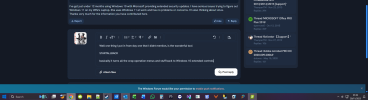
This is my desktop, or at least just a basic one, I use several
This utility has loads of useful features to change windows 11 into a friendly windows 7/10 style interfae and desktop menu bar. No more of the guess where this link takes you and "What do you really want to see" is all accessible .
It also amends the windows Explorer to a friendly and usable one with only a few mystery clicks you can now have windows 10 back on windows 11. It costs a small fee to get a permananet license so no stupid rent it for a month at only $499.99 per month

This turned my windows 11 nightmare into something easy to use and friendly from windows 10
I will point out that I upgraded throught the windows upgrade system from 10 directly to windows 11, not a clean install of windows 11. Seeing as I have around 3TB of data and programs on the drive it saved me a few hourse of reinstalling.
STARTALLBACK
basically it turns all the crap operation menus and stuff back to Windows 10 extended controls
This is my desktop, or at least just a basic one, I use several
StartAllBack to fix all Windows 11 deal-breaking UI issues
StartAllBack restores taskbar, start menu, context menus, explorer, sanity, style and order!
www.startallback.com
This utility has loads of useful features to change windows 11 into a friendly windows 7/10 style interfae and desktop menu bar. No more of the guess where this link takes you and "What do you really want to see" is all accessible .
It also amends the windows Explorer to a friendly and usable one with only a few mystery clicks you can now have windows 10 back on windows 11. It costs a small fee to get a permananet license so no stupid rent it for a month at only $499.99 per month
This turned my windows 11 nightmare into something easy to use and friendly from windows 10
I will point out that I upgraded throught the windows upgrade system from 10 directly to windows 11, not a clean install of windows 11. Seeing as I have around 3TB of data and programs on the drive it saved me a few hourse of reinstalling.

- Joined
- Nov 5, 2018
- Messages
- 3,682
- Thread Author
- #5
On the system I am currently using, I am using a trial of Stardoc of Start11. Pretty pricey, more than I am willing to pay $20 for lifetime license for 5 systems. Ironic, isn't it? I have to shell out money to get back to a sane GUI.
Of some concern is what is being sent to Microsoft with many of the specifics of your activities on YOUR system. MS has even gone to the extent of encrypted data sent in pieces of it at a time to be assembled into readable files when received. I read and saw some results of outbound packet sniffing tied to specific IPs.
The biggest tattletale of course is Copilot when removed with Revo, Revo reports it has been uninstalled, I hope so.
This info has some big value to buyers, ask Avast

 www.cbsnews.com
The same folks who were doing the sniffing are calling Win 11 25H2 rotten to the core. They report that Win 11 has so many holes it's impossible to stop all the data leaks of your personal info.
Makes Linux look better every day. Shoot you can't even trust the security programs that promise you enhanced privacy.
Of some concern is what is being sent to Microsoft with many of the specifics of your activities on YOUR system. MS has even gone to the extent of encrypted data sent in pieces of it at a time to be assembled into readable files when received. I read and saw some results of outbound packet sniffing tied to specific IPs.
The biggest tattletale of course is Copilot when removed with Revo, Revo reports it has been uninstalled, I hope so.
This info has some big value to buyers, ask Avast
Millions of Avast antivirus software customers are getting a refund. Here's why.
Millions of customers who bought Avast's antivirus tool may be eligible for a refund, regulators say.
www.cbsnews.com
The same folks who were doing the sniffing are calling Win 11 25H2 rotten to the core. They report that Win 11 has so many holes it's impossible to stop all the data leaks of your personal info.
Makes Linux look better every day. Shoot you can't even trust the security programs that promise you enhanced privacy.
Diguelo
Donator
- Joined
- Feb 1, 2023
- Messages
- 893
What gets sent to Microsoft, erm
If you look at it with any MS product, they know
If you listen to anything with a Microsoft product, they know
If you think you can use Windows without Microsoft knowing, then be prepared to do some investigating, port searching, network sniffing and port closing (This can sometimes mean the program that has been specificly design to "PROTECT YOUR PRIVACY AND SAFETY" cant talk to Microsoft and so to "PROTECT YOUR PRIVACY AND SAFETY" it refuses to work. Just in the interests of "PROTECT YOUR PRIVACY AND SAFETY" of course.
SO with that in mind,
Microsoft EDGE
Microsoft COPILOT
Microsoft AI whatever
Microsoft Office all garden varieties and upwards
Windows Media Player
Pretty much as their director recently said in an interview
"IF YOU WATCH IT WE WOULD LIKE TO KNOW, IF YOU LISTEN TO IT WE WOULD LIKE TO KNOW, IF YOU DO IT WE WOULD LIKE TO KNOW, in the interests of course to "PROTECT YOUR PRIVACY AND SAFETY"
If you look at it with any MS product, they know
If you listen to anything with a Microsoft product, they know
If you think you can use Windows without Microsoft knowing, then be prepared to do some investigating, port searching, network sniffing and port closing (This can sometimes mean the program that has been specificly design to "PROTECT YOUR PRIVACY AND SAFETY" cant talk to Microsoft and so to "PROTECT YOUR PRIVACY AND SAFETY" it refuses to work. Just in the interests of "PROTECT YOUR PRIVACY AND SAFETY" of course.
SO with that in mind,
Microsoft EDGE
Microsoft COPILOT
Microsoft AI whatever
Microsoft Office all garden varieties and upwards
Windows Media Player
Pretty much as their director recently said in an interview
"IF YOU WATCH IT WE WOULD LIKE TO KNOW, IF YOU LISTEN TO IT WE WOULD LIKE TO KNOW, IF YOU DO IT WE WOULD LIKE TO KNOW, in the interests of course to "PROTECT YOUR PRIVACY AND SAFETY"
As XP64 is still my daily driver, you can tell how much I worry about updates. However, my other EOL'd systems have not discovered they are EOL. Guess what got security updates within the past month?
Win10 Pro -- told me "this device is no longer receiving updates" then on the very same Settings pane, proceeded to download 5 security updates and two system updates
Win8.1 -- plus got a major system update in August! (both 8.1 Pro in VM and 8.1 Enterprise on hardware)
Win7 Pro -- two security updates last week -- yes really! (Previously got some in May 2025)
None have been patched for extended updates. I think Microsoft has an automated update build farm that just churns 'em all and doesn't distinguish by EOL.
Meanwhile, the Win11 netbook already whined that "this device is too old and no longer receives updates." (Tho its twin does, so it's not a hardware limit.)
My method of beating Win11 into submission: force a local login (I'm guessing that negates most of the snooping, hence the efforts to enforce a Microsoft login), and install OpenShell, and spend ten minutes with Winaero Tweaker (which can also reliably disable updates even in Win11, if you so choose). Makes for a much more pleasant experience.
However, it's looking more and more like Win11 will be the last usable version, and the next major version will be Windows as a Subscription Service (what do you think disk encryption by default in conjunction with enforced Microsoft logins are really about, hmmmm??) So I've been hoarding useful Windows software, mostly meaning graphics apps that have no reasonable equivalent on linux, in the expectation that Win11 will be my final Windows. (Humble Bundle has lately offered CorelDraw on the cheap. PhotoPaint is my can't live without.)
As to linux, Win10 drove me to trawl through hundreds of distros until I found options I could live with. (PCLinuxOS and Fedora, both with the KDE Plasma desktop.) But the linux filesystems are not as reliable as NTFS, and desktop stability is not on par with Windows, and the Rust madness is doing it no good... so a total switch is not going to happen. But maintaining old Windows, so I don't have to reach through the screen and force-choke a Microsoft developer? I'm already used to that.
Side note: PaintShopPro, at least older versions, tolerates being dragged from one system to the next. The PSP8 that I have on Win11 was first installed on WinME, and never reinstalled since. (It was probably from FOSI, by now I don't remember.)
Win10 Pro -- told me "this device is no longer receiving updates" then on the very same Settings pane, proceeded to download 5 security updates and two system updates
Win8.1 -- plus got a major system update in August! (both 8.1 Pro in VM and 8.1 Enterprise on hardware)
Win7 Pro -- two security updates last week -- yes really! (Previously got some in May 2025)
None have been patched for extended updates. I think Microsoft has an automated update build farm that just churns 'em all and doesn't distinguish by EOL.
Meanwhile, the Win11 netbook already whined that "this device is too old and no longer receives updates." (Tho its twin does, so it's not a hardware limit.)
My method of beating Win11 into submission: force a local login (I'm guessing that negates most of the snooping, hence the efforts to enforce a Microsoft login), and install OpenShell, and spend ten minutes with Winaero Tweaker (which can also reliably disable updates even in Win11, if you so choose). Makes for a much more pleasant experience.
However, it's looking more and more like Win11 will be the last usable version, and the next major version will be Windows as a Subscription Service (what do you think disk encryption by default in conjunction with enforced Microsoft logins are really about, hmmmm??) So I've been hoarding useful Windows software, mostly meaning graphics apps that have no reasonable equivalent on linux, in the expectation that Win11 will be my final Windows. (Humble Bundle has lately offered CorelDraw on the cheap. PhotoPaint is my can't live without.)
As to linux, Win10 drove me to trawl through hundreds of distros until I found options I could live with. (PCLinuxOS and Fedora, both with the KDE Plasma desktop.) But the linux filesystems are not as reliable as NTFS, and desktop stability is not on par with Windows, and the Rust madness is doing it no good... so a total switch is not going to happen. But maintaining old Windows, so I don't have to reach through the screen and force-choke a Microsoft developer? I'm already used to that.
Side note: PaintShopPro, at least older versions, tolerates being dragged from one system to the next. The PSP8 that I have on Win11 was first installed on WinME, and never reinstalled since. (It was probably from FOSI, by now I don't remember.)
Last edited:

garibaldo''
VIP
- Joined
- Mar 10, 2024
- Messages
- 175
Why not?But the linux filesystems are not as reliable as NTFS, and desktop stability is not on par with Windows,
I don't know the technical reasons. However, when I've had to run fsck (essentially chkdsk for linux) it is very likely to just delete files when it corrects disk errors. (This is on ext4, probably the most mainstream of the linux filesystems.) I've seen it delete multiple GB of files, and NONE of those files should have been open on disk (having been written weeks or months before). I've never seen that behavior in 35 years of DOS/Windows.Why not?
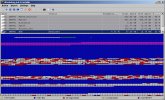
For another thing, if the drive doesn't have a whole lot of empty space, really absurd fragmentation, and AFAIK no defrag utility. How absurd? Below is a flash drive containing ISO files. Windows wrote all the contiguous files. Linux wrote the fragmented (red) file, despite that there was enough room to write it in no more than three or four chunks. The file was damaged beyond use, and copying it back into a contiguous state did not recover it. Yes, ALL of the red segments are a single file!
[I'm no sysadmin, but I'm not entirely the green newb on linux; I go all the way back to RedHat6, and have been using PCLinuxOS over 8 years and Fedora almost 6 years, plus shorter stints on other distros. For all the things I like about linux, it still has frustrations and drawbacks that can exceed those in Windows.]
Attachments
Diguelo
Donator
- Joined
- Feb 1, 2023
- Messages
- 893
If memory serves correctly, Defragging anything in Linux used to be a case of File copied to store location, original file deleted, file copied to new location, copied source deleted on whole. this was how it worked on windows for a time.
Losing a file in a defrag, shouldnt be happening regardless of OS used.
UNLESS
You are using a SSD
You are using an M.2 drive.
And my personal favourite, you are using a SCSI drive with a generic connector card.
If any of these apply to any of the drives in your system, the drives automatically defrag files as and when they are used and defrag shouldnt be attempted. Main issue is the data is stored in logical patterns in the drive ram and forcing it to be moved would cause deletion.
Been a while since I played with Linux I do need refreshers on it.
Oh and if you use a VM mounted OS, dont mess with the VM. They are generically unstable and dont like to be messed with. SOme will go through the motions, but not actually move or alter anything.
Losing a file in a defrag, shouldnt be happening regardless of OS used.
UNLESS
You are using a SSD
You are using an M.2 drive.
And my personal favourite, you are using a SCSI drive with a generic connector card.
If any of these apply to any of the drives in your system, the drives automatically defrag files as and when they are used and defrag shouldnt be attempted. Main issue is the data is stored in logical patterns in the drive ram and forcing it to be moved would cause deletion.
Been a while since I played with Linux I do need refreshers on it.
Oh and if you use a VM mounted OS, dont mess with the VM. They are generically unstable and dont like to be messed with. SOme will go through the motions, but not actually move or alter anything.
garibaldo''
VIP
- Joined
- Mar 10, 2024
- Messages
- 175
What problems was you having that let you to run fsck?I don't know the technical reasons. However, when I've had to run fsck (essentially chkdsk for linux) it is very likely to just delete files when it corrects disk errors. (This is on ext4, probably the most mainstream of the linux filesystems.) I've seen it delete multiple GB of files, and NONE of those files should have been open on disk (having been written weeks or months before). I've never seen that behavior in 35 years of DOS/Windows.
For another thing, if the drive doesn't have a whole lot of empty space, really absurd fragmentation, and AFAIK no defrag utility. How absurd? Below is a flash drive containing ISO files. Windows wrote all the contiguous files. Linux wrote the fragmented (red) file, despite that there was enough room to write it in no more than three or four chunks. The file was damaged beyond use, and copying it back into a contiguous state did not recover it. Yes, ALL of the red segments are a single file!
[I'm no sysadmin, but I'm not entirely the green newb on linux; I go all the way back to RedHat6, and have been using PCLinuxOS over 8 years and Fedora almost 6 years, plus shorter stints on other distros. For all the things I like about linux, it still has frustrations and drawbacks that can exceed those in Windows.]
Was you computer super slow due to defragmentation of files on HDD?
I should have clarified: I was using the defrag utility to VIEW the condition of the files on the flash drive. I did NOT defrag the flash drive. This has nothing to do with defragmentation utilities. Rather, it painfully illustrated that the idea that "linux does not fragment files" is a myth.
In fact when I went seeking a defrag utility for linux, I was told (repeatedly) that the only method available was the same one we used with DOS5 and before: Copy all the files elsewhere, format the disk, and copy everything back. Also, that linux simply writes files somewhere beyond the "end" of whatever files are already written, and makes no attempt to lay them consecutively nor to find a good "fit". So once a linux drive has less than about 30% free space, one can expect massive fragmentation.
A separate problem: Why did I ever need to run fsck? An update (most likely a kernel update) introduced instability that had not been there before, and the system developed a habit of locking up solid for no visible reason, requiring a hard power off. It then enforced running fsck before it would boot to the desktop. (This happened for several months, then suddenly went away, probably thanks to another kernel update. It is a very vanilla system, so has no weird-software excuses.) At first I thought the SSD was failing, but nope, it's fine. Anyway, since I watched fsck run (using no arguments, so it wasn't me picking a weird function) I saw it deciding to delete files, and when I checked, yep, gone. It never deleted system files (in fact, it never checked the system partition at all). Only files that had been saved as data in /home (which is a separate partition).
My point is that there are reliability factors here where Windows is decidedly superior.
1) natural fragmentation is not nearly as severe
2) the disk checking utility is nondestructive, and even at worst attempts to save a copy.
I like my linux boxen, and I use them every day. But I no longer trust linux for long-term storage, neither the filesystem nor the file writes. And I no longer let it write directly to a storage drive (not even over my local network); rather, I use an expendable middleman drive that I don't mind reformatting now and then.
I have not heard of any drives, SSD or NMVe, that auto-defrag themselves. I have both an SSD and two NVMe drives in the XP64 box, and an NVMe in the Win11 box, and they all become fragmented over time, and on XP, they stay that way (the NVMe drives are new enough to do their own chores independent of the OS, so that's not the issue). Are you sure you're not seeing Windows' own maintenance? because since Win7, Windows silently defrags in the background. XP does not.
And the size of modern drives makes using a dedicated whole-disk defrag utility impractical.
(On Windows, I use a dedicated partition for cache and temp files, as they are the worst causes of fragmentation.)
In fact when I went seeking a defrag utility for linux, I was told (repeatedly) that the only method available was the same one we used with DOS5 and before: Copy all the files elsewhere, format the disk, and copy everything back. Also, that linux simply writes files somewhere beyond the "end" of whatever files are already written, and makes no attempt to lay them consecutively nor to find a good "fit". So once a linux drive has less than about 30% free space, one can expect massive fragmentation.
A separate problem: Why did I ever need to run fsck? An update (most likely a kernel update) introduced instability that had not been there before, and the system developed a habit of locking up solid for no visible reason, requiring a hard power off. It then enforced running fsck before it would boot to the desktop. (This happened for several months, then suddenly went away, probably thanks to another kernel update. It is a very vanilla system, so has no weird-software excuses.) At first I thought the SSD was failing, but nope, it's fine. Anyway, since I watched fsck run (using no arguments, so it wasn't me picking a weird function) I saw it deciding to delete files, and when I checked, yep, gone. It never deleted system files (in fact, it never checked the system partition at all). Only files that had been saved as data in /home (which is a separate partition).
My point is that there are reliability factors here where Windows is decidedly superior.
1) natural fragmentation is not nearly as severe
2) the disk checking utility is nondestructive, and even at worst attempts to save a copy.
I like my linux boxen, and I use them every day. But I no longer trust linux for long-term storage, neither the filesystem nor the file writes. And I no longer let it write directly to a storage drive (not even over my local network); rather, I use an expendable middleman drive that I don't mind reformatting now and then.
I have not heard of any drives, SSD or NMVe, that auto-defrag themselves. I have both an SSD and two NVMe drives in the XP64 box, and an NVMe in the Win11 box, and they all become fragmented over time, and on XP, they stay that way (the NVMe drives are new enough to do their own chores independent of the OS, so that's not the issue). Are you sure you're not seeing Windows' own maintenance? because since Win7, Windows silently defrags in the background. XP does not.
And the size of modern drives makes using a dedicated whole-disk defrag utility impractical.
(On Windows, I use a dedicated partition for cache and temp files, as they are the worst causes of fragmentation.)
garibaldo''
VIP
- Joined
- Mar 10, 2024
- Messages
- 175
about 100% of servers and cientific and cloud computers around the world are Linux computers...
but, hey, this is a windows forum, right? 8-D
but, hey, this is a windows forum, right? 8-D
But they are not Random Desktop Linux (which is all over the place for quality, stability, manageability, and features). They're either server instances, or something monolithic like Ubuntu or Fedora Workstation.about 100% of servers and cientific and cloud computers around the world are Linux computers...
And yes, by amazing coincidence, we are on a Windows forum! should we not discuss where Windows does it better?

garibaldo''
VIP
- Joined
- Mar 10, 2024
- Messages
- 175
to defrag a Ext4 or ZFS filesystem in a NVE is like trying to regulate a carburetor in a eletric car...
I can´t understand this nostalgia of people using XP64, even Windows 10, and SCSI disks...
next month, will be 2026...
I can´t understand this nostalgia of people using XP64, even Windows 10, and SCSI disks...
next month, will be 2026...
Diguelo
Donator
- Joined
- Feb 1, 2023
- Messages
- 893
It was a good processor and still runs stable. I have a couple of clients that do swear by them. Sadly they are getting rarer now, mainly due to open bin insert old machine close bin walkaway etc.
Although it has to be said I found the 32 bit very very stable back in the day.
Using a defrag tool to get an idea of the surface/layout data on a drive is a limited way of a quick glance rather than a full read of the drive. O&O defrag used to give a lot more info than standard defrag utils. with file highlighting if needed..
Although it has to be said I found the 32 bit very very stable back in the day.
Using a defrag tool to get an idea of the surface/layout data on a drive is a limited way of a quick glance rather than a full read of the drive. O&O defrag used to give a lot more info than standard defrag utils. with file highlighting if needed..
Similar threads

- Article
- Replies
- 2
- Views
- 1K
- Article
- Replies
- 0
- Views
- 1K
- Replies
- 0
- Views
- 1K
- Replies
- 6
- Views
- 2K

