website stat Windows10-Consumer-ESU-Enrollment-v0.0.8 | The Windows Forum
Install the app
How to install the app on iOS

Follow along with the video below to see how to install our site as a web app on your home screen.

Note: This feature may not be available in some browsers.

Welcome to TheWindowsForum

Since 2010 — Over 15 years of helping Windows users worldwide.

Join thousands of Windows enthusiasts & IT pros. Ask questions, share tips, download resources, and connect with the community — free and always friendly.

  • Post & reply in threads
  • Private message other members
  • Access exclusive guides & downloads
  • NO ADS for registered users

Windows10-Consumer-ESU-Enrollment-v0.0.8

Joined
Dec 1, 2025
Messages
5
I am trying to install this script but i cant because i need ( Cumulative Update 2025-06 KB5061087 (19045.6036) or later. ) i need to find out where i can download this update and install it. so i can run that script. thanks yall
 
Thumper now how do i install these updates. Or where do i place them i.e: folder/sub directory what?
thank uso so much
 
how thumper how do i install them they open as excel files
but they are actually .csv files. im so confused
 
I am trying to install this script but i cant because i need ( Cumulative Update 2025-06 KB5061087 (19045.6036) or later. ) i need to find out where i can download this update and install it. so i can run that script. thanks yall
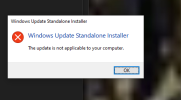
You don’t need to hunt for that specific KB manually.
The Cumulative Update KB5061087 (19045.6036) is part of the Windows 10 22H2 update chain.
The easiest way to get it is:


  1. Go to Settings → Windows Update → Check for Updates
    Let Windows pull the latest cumulative update automatically.
    You just need your system to reach build 19045.6036 or higher.
  2. If Windows Update doesn’t offer it, download it manually from Microsoft’s official site:

    Microsoft Update Catalog:
    https://www.catalog.update.microsoft.com/

    Search for: KB5061087
    Download the version that matches your system (x64).
  3. Install it, restart your PC, and your Windows build version should update.
    To confirm, run:
    winver
    and check that you’re on 19045.6036 or later.

After you update, the script you’re trying to run should work without issues.
 

Support TheWindowsForum

Help us stay ad-free and keep the community running

Donate Now

Trending content

Back
Top