website stat REINSTALL WINDOWS TO FIX ERRORS ! ! ! | The Windows Forum
Install the app
How to install the app on iOS

Follow along with the video below to see how to install our site as a web app on your home screen.

Note: This feature may not be available in some browsers.

Welcome to TheWindowsForum

Since 2010 — Over 15 years of helping Windows users worldwide.

Join thousands of Windows enthusiasts & IT pros. Ask questions, share tips, download resources, and connect with the community — free and always friendly.

  • Post & reply in threads
  • Private message other members
  • Access exclusive guides & downloads
  • NO ADS for registered users

REINSTALL WINDOWS TO FIX ERRORS ! ! !

Diguelo

Donator
Joined
Feb 1, 2023
Messages
721
Talk about drastic solutions to small problems

1774524893563.png

Yes your windows 11 installation isnt working properly, just wipe the drive and reinstall it, itll be fine, HONEST

In the years I have used windows more as a convenient gaming experience and programming platform than anything I have never ever seen this NEEDING TO BE DONE, they mess things up and spend millions on programmers fresh out of college to do the updating and they havent got half a clue what they doing. Anyhow this has been on my windows update screen now for 2 weeks and so far i have run

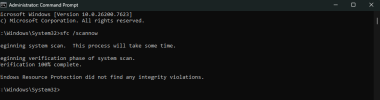
SFC /SCANNOW
1774525392576.png

There own check tool says theres nothing wrong with the system.

So.................
 
System File Checker (sfc) is not intended to tell you that there's nothing wrong with the system, only that none of the system files are missing or corrupted (and replace any that are). If you are having a recurring issue installing updates, an in-place upgrade is probably your best option. No settings or installed programs will be affected:
 
Last edited:
It's about time they admit it. We have a bank of 40 identical systems that refuse to accept an update (KB5079473) for as many as 20 times some times far less before they magically accept it. The current image now has this update incorporated into it. The unfortunate thing is we have fresh systems that need to access the SCCM server first.
 
I have never had such a problem. It is possible that it is also due to the Windows configuration. Try this code.
Code:
chkdsk/f C:
 
Microsoft admit to training monkeys.

I believe the comic Bob Newhart wound up the best phrase for this "If you put an infinite number of monkeys in front of infinite numbner of typewrietrs eventually they will write the classics. Heres one example, TO BE OR NOT TO BE THAT IS THE GAZORNANPLTZ"

Roll on the days when they grab a guy off the street and stick him in front of a computer and say "There you go rewrite windows", what am i saying they do that already.

Ive told work the stuck security error is going to remain stuck and disabled the Window Defendar system with a reg key

As for CHKDSK/f C:

I have way better software than a simple dos script. All of it tells me the installation is perfect. There is of course a GENUINE need for the update from Windows 11 reinstall, to wipe the MAS script and its associated files from existence. Apart from that on an experimental machine there is now other change the file check didnt alter anything from before to after the reinstall just the wiping of keys
 
First of all, chkdsk /f has nothing to do with the Windows Configuration. Second, if you're going to run checkdisk, it's best to use the "r" switch which is more comprehensive, assumes the "f" switch, and repairs not only file inconsistencies in the MFT, but attempts to repair any physical disk errors as well (identifies bad sectors, marks them as unusable, and moves the data to a "clean" location). Last, I gave you advice above on how to solve your problem If you chose to ignore it that's fine, but continuing to complain about your problem without doing the in-place upgrade is certainly not going to solve anything.

I don't get this forum at all. I can see why traffic is so low.
 
Everyone is entitled to their own opinion. I did not say it was wrong nor did i criticise it. I merely use checking software and file comparison software becasue I like to know whose messing with my system and where.

Chkdsk is a basic systems analysis tool at best and the software i use is stuff I wrote. My life on these things has been a long and enjoyable experience from hobby to job to past time to helper, started in 1979 on the Jouney.

The issue at hand is the stuck update of windows security. Mine has a disablled Defender software issue where I turned it off so that may be the cause for mine. Yet another reason to reinstall windows because Granny says her way is best.

Comodo has kept me bug free for over 10 years now. as for defender in work and at home it has caused me and countless customers issues since Windows 7 went rogue
 
I wasn't suggesting you use chkdsk - I was explaining to Talaba what it does.

I AM suggesting you do an in-place upgrade
 
Don't trust the program which may have had a part in f'ing up your disk in the first place.
Instead go to the disk's manufacturers site and use their disk tools specific to their product. They wrote the the ROM which the disk relies on to function for any O/S. For that matter, I don't trust Windows to fix the errors in their already broken O/S.
Do a fresh install. Nothing works better than a clean speedy running fresh install. Reinstalling stuff can be a pain so it's always a good example of why good file housekeeping is important because you never know. Makes back ups and restores a heck of a lot easier.
 
First of all, chkdsk /f has nothing to do with the Windows Configuration. Second, if you're going to run checkdisk, it's best to use the "r" switch which is more comprehensive, assumes the "f" switch, and repairs not only file inconsistencies in the MFT, but attempts to repair any physical disk errors as well (identifies bad sectors, marks them as unusable, and moves the data to a "clean" location). Last, I gave you advice above on how to solve your problem If you chose to ignore it that's fine, but continuing to complain about your problem without doing the in-place upgrade is certainly not going to solve anything.

I don't get this forum at all. I can see why traffic is so low.
Not everyone spends hours Trolling web sites looking for something to whine about. All who have something to contribute towards helping others are more than welcome here. As for low traffic, yes we have low traffic because most of the time the crew come up with simple solutions to issues that dont cost the earth to impliment or wait for a Engineer to come out and fix.

Information is free to all, those in need that have found us get help as and when needed. Go grab another 6 pack and chill with us. All are welcome to come here for advice.

I personally have run a succesful Computer Hardware and Software business for many years, been using computers since they arirved in the UK. I know my way around most systems and OS and some other forms of code but we wont go into that.

Love the Stars and Stripes icon, even if I am English.
 
Last edited:
I wasn't suggesting you use chkdsk - I was explaining to Talaba what it does.

I AM suggesting you do an in-place upgrade
As part of this, maybe add some instructions and clarify your statement, to share with all. In place upgrade I assume you mean do an update?

A phrase comes to mind once said by a very knowledgable person "Opinions are like A**Holes, everyone has one and they are all different"
 
My first post includes a link which gives very clear instructions on how to perform an in-place upgrade.

Clearly this isn't the forum for me. It's been nice knowing you all.
 
Update as of 02/04/2026

The update that has been stuck in the queue has been sorted out probably by a passing Amazon driver close tot he Microsoft office whose no head of programs and development or a mail room promotion to departemnt head.
 

Support TheWindowsForum

Help us stay ad-free and keep the community running

Donate Now

Trending content

Back
Top
