Follow along with the video below to see how to install our site as a web app on your home screen.
Note: This feature may not be available in some browsers.
Welcome to TheWindowsForum
Since 2010 — Over 15 years of helping Windows users worldwide.
Join thousands of Windows enthusiasts & IT pros. Ask questions, share tips, download resources,
and connect with the community — free and always friendly.
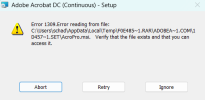
I was installing this program, and everything to be running smoothly then I received this error message. Can soomeone please help me?View attachment 6859
When trying to install the setup, that's when I get the error message. I had downloaded the 2026 version from the net prior, but uninstalled before trying to reinstall this version.
1.Disable your antivirus
2.Download again
3.Extract rar archive
4.Rename folder name to something shorter exmaple "adobe"
5.Run setup as administrator, when installation finishes don't run acorbat
6.Run update as administrator
then follow other installation steps.
Can you tell me how to disable my Antivirus? I have McAfee and can't figure that out. I disabled the firewall but can't seem to figure out the who Antivirus. I even attempted to just stop it through the Task Manager, but it wouldn't let me stop the program.
Should I download WinRAR? Right now, I don't have any zip extractor program.
Alright I have everything downloaded. I'm at the part where I am supposed to place AdobeGenP.exe into the "installation" folder. Now is that folder already created or is this a folder that I unzipped from the file I downloaded? I don't want to start putting things where they don't belong and mess things up.
Alright I have everything downloaded. I'm at the part where I am supposed to place AdobeGenP.exe into the "installation" folder. Now is that folder already created or is this a folder that I unzipped from the file I downloaded? I don't want to start putting things where they don't belong and mess things up.
There are some great resources posted in this forum. READ THEM, UNDERSTAND THEM, FOLLOW THEM, no shortcuts. Here's a couple of threads among others you should copy, they are invaluable resources.
Make sure you read these threads until the end.
Hey Been using photoshop 2023 for a while now, but recently it's been popping up as unlicensed software, so i assume adobe has sorted out a workaround to the crack, does anyone have a solution to this issue? I've tried uninstalling and reinstalling a couple of times but the most i've managed to get is a few minutes before i get locked out again, any help to resolve would be appreciated
I have small brain, please excuse....
Wot I did is:
Turn of Win Defender and all active scanning I could find ( about 5 sliders)
(That's the only AV I have)
Downloaded Torrent, got files shown.
The readme says "
Instructions:
1) Mount ISO and install office
2) Make sure Office setup is closed, from Activator Folder run as ADMINISTRATOR "KMS_VL_ALL_AIO" and type 1
DONE!
You can always thank us here: www.TheWindowsForum.com / www.ThumperDC.com"
I don't see an ISO file.
What am I missing?
Once done I assume I have to hide things from Windows Defender...
Yes But what then? There is no CRACK anywhere, except of CRACK folder with just Readme. Sorry I am not IT, which folder is an installation folder and what is the name of the CRACK which must be copied into it ?
Thank thousand times.
Btw I am Paul but my name was taken. I am from Slovakia and I love sun, boxing and bachata. I am an IT antitalent and try to make the cracks work but until now with no success.
This site uses cookies to help personalise content, tailor your experience and to keep you logged in if you register.
By continuing to use this site, you are consenting to our use of cookies.