website stat ssd locked | The Windows Forum
Install the app
How to install the app on iOS

Follow along with the video below to see how to install our site as a web app on your home screen.

Note: This feature may not be available in some browsers.

Welcome to TheWindowsForum

Since 2010 — Over 15 years of helping Windows users worldwide.

Join thousands of Windows enthusiasts & IT pros. Ask questions, share tips, download resources, and connect with the community — free and always friendly.

  • Post & reply in threads
  • Private message other members
  • Access exclusive guides & downloads
  • NO ADS for registered users

ssd locked

Rad

New Member
Joined
Oct 28, 2025
Messages
1
for starters: I am not an IT expert, just a regular user. I bought a used mSATA and it is not accessible: it was showing ( on USB) as No media, 0 bytes. chkdsk took me to Cannot Open Volume for Direct Access. So, I followed internet instructions, like Safe Mode, disable third party apps, and - eventually - I ended up with two hard drives not usable: now the PC main ssd (Win10) on startup opens the Windows logo, and after few seconds logo is gone and a dots/ring starts turning, for ever...
Any tried solutions, at least for the PC? Is there a way to bring it back to life fiddling with bios? Or, is there a really free software that would reverse my mistakes, and possibly work on that external mSATA as well...
 
All I can share with you are my experiences. There is an HP program that can open up the impossible, it escapes me what it is. Personally I rely on EaseUS Partition Master, it has worked for me when nothing else I tried worked.
You may be looking at a bitlocker encrypted SSD, I haven't had much experience with that. I am aware that trying to do anything in a Windows environment, it ain't happening. That's going to be true of any SSD that is inaccessible due to encryption done with Windows.
The answer of course is to attack the SSD with another O/S environment. That is if it's not physically damaged which is always a possibility. Did the seller sell the drive as/is of did they warrant it? I used to come across boatloads of all kinds of drives, that's why I mention the HP program. I would be a bit weary as it seems as though the new SSD seriously affected your C boot drive.
 
Can we have more info please.

You say its an msata drive, Make model please.

SATA Configuration if applicable Mirror or other, is there a second SATA drive in unison with it.

If your using a single msata drive, seeing as msata wont fit in the standard M.2 socket and requires a msats board generally to make it work. They were a kind of failed attempt at hyperspeed raid using a parralel interface connection system so you could have 2 msata drives set up in RAID Mirror or striped configuration.

Worst issue is heat generation, however

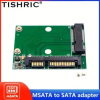
1761629351213.png

An interface device like this or one with USB 3.0 wil be necessary for you to use it. Once you have one you should find it configurable in DRIVE OPTIONS in the settings menu.

If you have only just bought it, I doubt it will be damaged but talking to it without the right interface is going to be impossible.
 

Support TheWindowsForum

Help us stay ad-free and keep the community running

Donate Now

Trending content

Back
Top